Usage Logs
This section displays all information about the NAS connection time of login and logout for a single session. It also displays a router’s IP address and the download & upload speed.
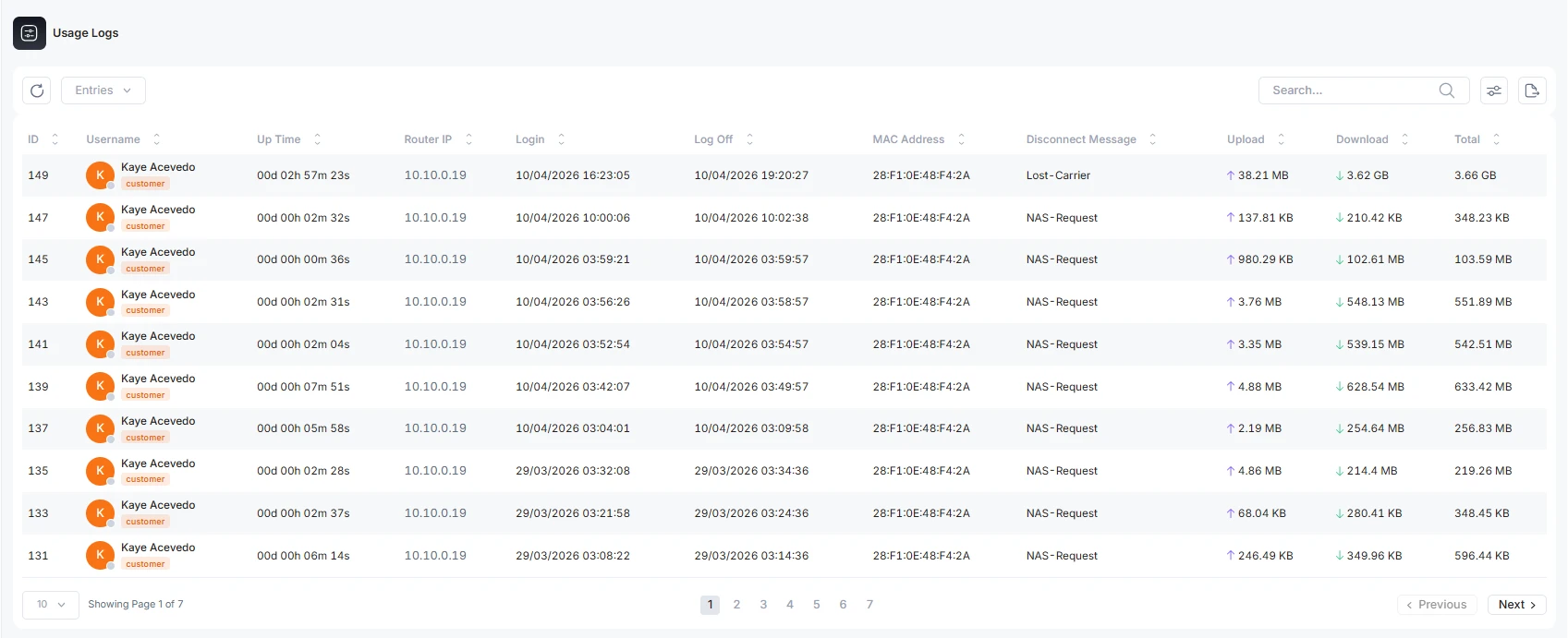
These are the terms you can see from the usage log
Username: The name of the customer
Uptime: The time period for a single session
Router IP: Router address for a particular customer
Login time: The time and date the router started
Logoff time: The time and date the router stopped working
MAC Address: The MAC address of the router device
Disconnect message: The reason why the router disconnected
Upload: The user's upload data
Download: The user's download data
Total: Combine data of upload and download
Disconnect Messages Meaning
These are exact terminating messages standardized in RFC 2866 (RADIUS Accounting) defining under Section 5.10: Acct-Terminate-Cause (Attribute 49)
These are the codes NAS (router) sends to Free-RADIUS in an accounting-stop packet. Here is a complete list of 18 standard Acct-terminate-cause messages defined by RFC.
RFC 2866: Acct-Terminate-Cause Values
| Code | Message | Real-World Meaning |
| 1 | User Request | The user cleanly and explicitly disconnected (e.g., logged out or clicked disconnect). |
| 2 | Lost Carrier | The physical or wireless link dropped unexpectedly (e.g., out of Wi-Fi range or unplugged cable). |
| 3 | Lost Service | The NAS can no longer provide the service to the user, usually due to an upstream failure. |
| 4 | Idle Timeout | The user was inactive for too long, and the NAS disconnected them to save resources. |
| 5 | Session Timeout | The user reached their absolute maximum allowed connection time. |
| 6 | Admin Reset | An administrator manually terminated the session or reset the specific port. |
| 7 | Admin Reboot | An administrator cleanly restarted the NAS, closing all active sessions gracefully. |
| 8 | Port Error | The NAS detected a hardware or data-link protocol error on that specific port. |
| 9 | NAS Error | The NAS experienced an internal error (not specific to the port) that forced the disconnect. |
| 10 | NAS Request | The NAS intentionally ended the session for a routine, non-error reason (like a policy update). |
| 11 | NAS Reboot | The NAS crashed or lost power and is reporting this after booting back up. |
| 12 | Port Unneeded | The NAS decided the connection is no longer required (rare in modern Wi-Fi, mostly used in dial-up/ISDN). |
| 13 | Port Preempted | The NAS disconnected the user to give the port/resources to a higher-priority connection. |
| 14 | Port Suspended | The NAS temporarily suspended the session (the user may be reconnected later). |
| 15 | Service Unavailable | The NAS could not deliver the specific service or parameters requested during authorization. |
| 16 | Callback | The NAS ended the initial session to immediately dial back/reconnect the user (legacy dial-in security). |
| 17 | User Error | The user's device sent incorrect, malformed, or invalid input that forced a disconnect. |
| 18 | Host Request | The destination login host (the server the user was ultimately connecting to) terminated the session. |
Share Usage Logs
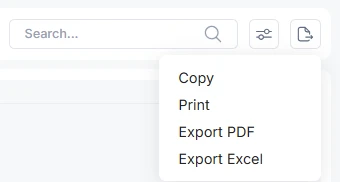
The usage logs can be shared with another person in four ways, copy the log and paste in other file. Print the activity log directly. Export the file in pdf or excel form.