Add Partner
Applies to all editions
The partner system is AltRadius's reseller layer. It lets your branch sell service through a chain of resellers, each of whom manages their own customers, buys plans from the level above at an agreed price, and adds their own margin.
There are three positions in the hierarchy:
| Position | Who creates it | Sits under |
|---|---|---|
| Senior Partner | Admin only | The branch |
| Partner | Admin or Senior Partner | A Senior Partner |
| Agent | Admin, Senior Partner, or Partner | A Partner |
Operator guide
The partner system is AltRadius's reseller layer. It lets your branch sell service through a chain of resellers, each of whom manages their own customers, buys plans from the level above at an agreed price, and adds their own margin.
There are three positions in the hierarchy:
| Position | Who creates it | Sits under |
|---|---|---|
| Senior Partner | Admin only | The branch |
| Partner | Admin or Senior Partner | A Senior Partner |
| Agent | Admin, Senior Partner, or Partner | A Partner |
Important: Senior Partner, Partner, and Agent are positions in the hierarchy, not different levels of authority. They have identical roles, identical scopes, and identical permissions , each one manages only its own customers and its own downline. A Senior Partner is not a branch authority; that role belongs to the Admin (the branch's own main user). The names only mark where a reseller sits in the referral chain.
Where to find it: Sidebar → User Management → Partners.
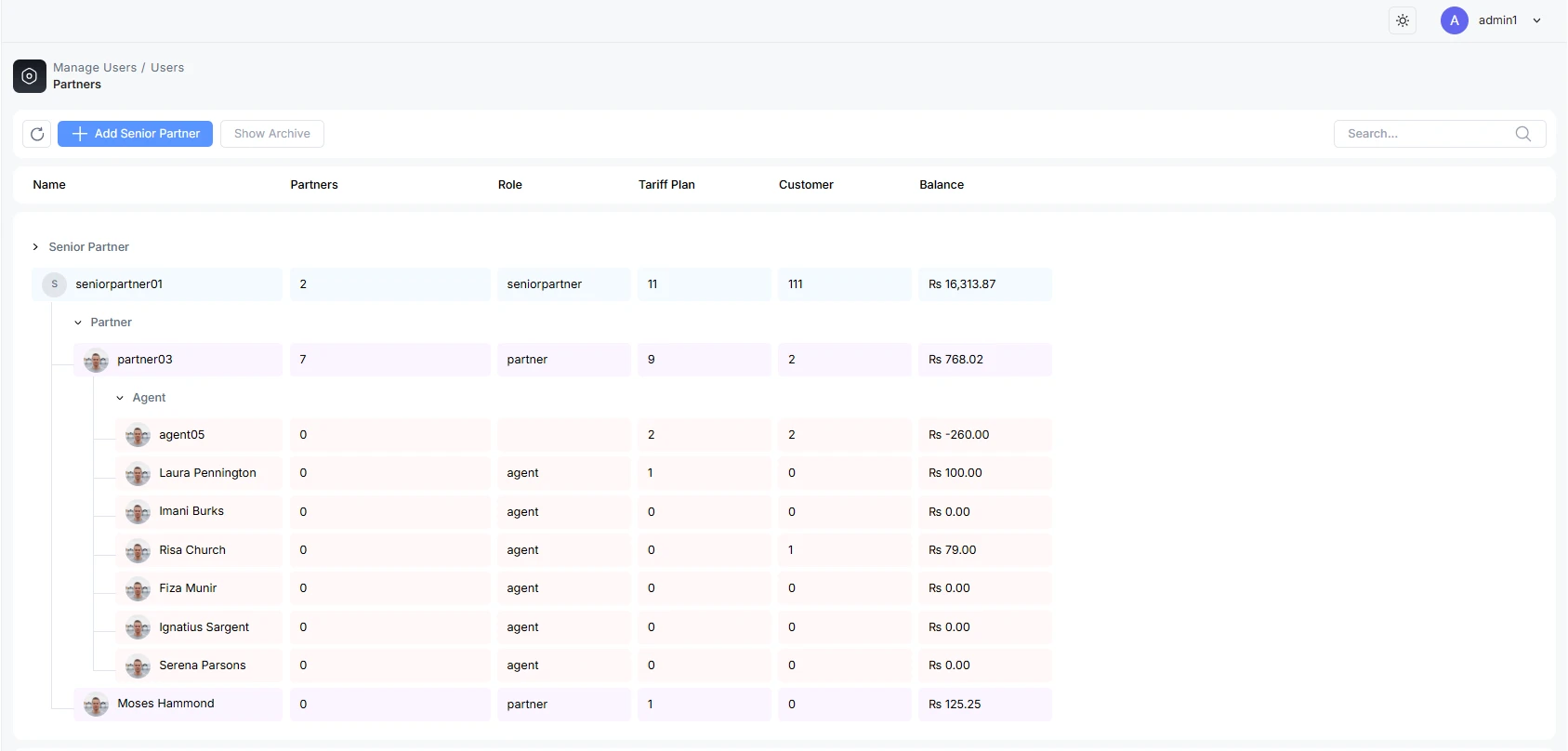
How the hierarchy works
The Partners page shows your resellers as a tree. Each row shows the reseller's name and role, how many sub-partners they have, how many packages are assigned to them, their customer count, and their wallet balance.
- A Senior Partner can add their own customers and can create Partners beneath them.
- A Partner can add their own customers and can create Agents beneath them.
- An Agent adds their own customers (the leaf of the chain).
Each reseller only ever sees and acts on their own customers and downline. Tier skipping is not allowed , a Senior Partner works with their direct Partners, a Partner with their direct Agents.
Pricing down the chain
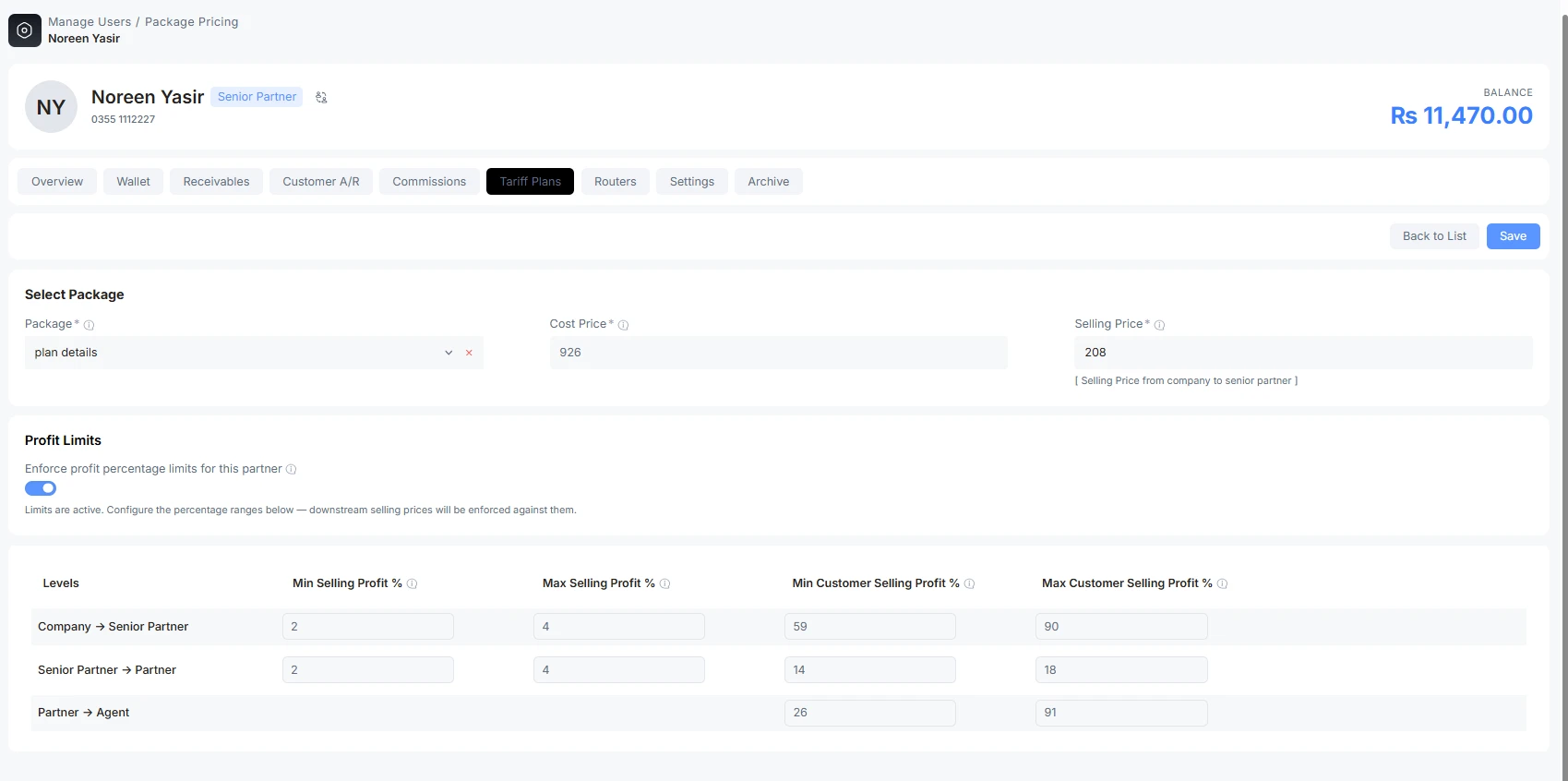
A plan is assigned down the chain, and each level adds its own margin within a range you control:
- The Admin sets the plan's base (cost) price.
- The Senior Partner sells it to their Partners at a price within the partner selling range you set, and to their own customers within the customer selling range.
- Each level below does the same to the level beneath it.
Selling above or below the allowed range is rejected , the system enforces the band on both the screen and the server, so pricing stays fair at every hop. (If a plan has profit limits switched off, the range check is skipped and the reseller can price freely.)
Create a Senior Partner
Senior Partners are created by the Admin from the top of the tree.
Step 1 , Open the form
On the Partners page click Add Senior Partner.
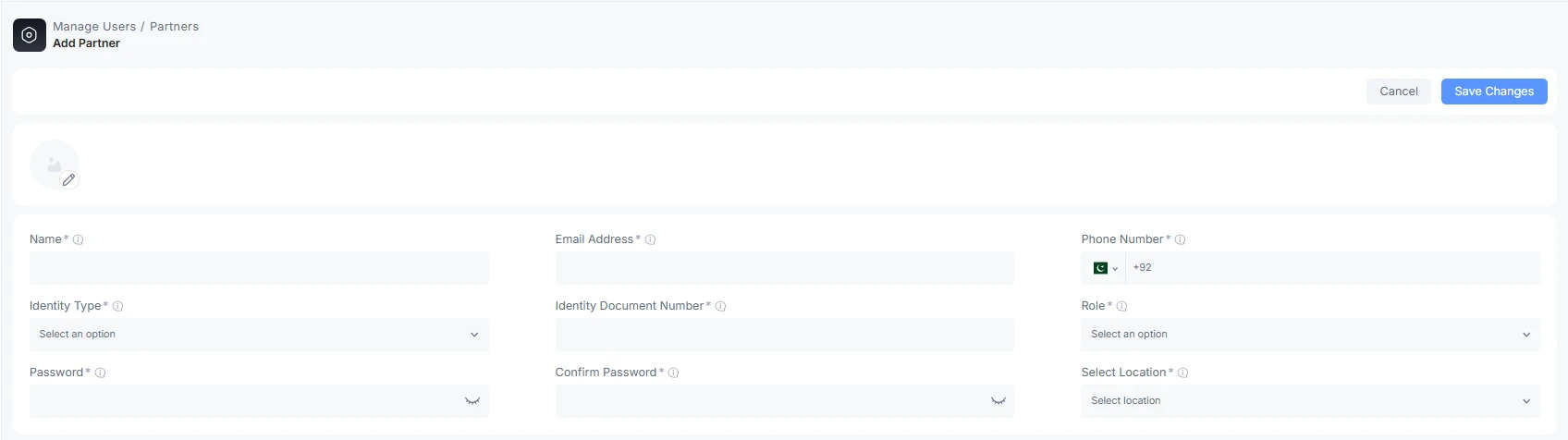
Step 2 , Fill in the details
| Field | What it does | Notes |
|---|---|---|
| Profile picture | Optional avatar. | Upload from the circular control at the top. |
| Name | The reseller's real name. | Required. |
| Email Address | Contact / login email. | Required and unique. |
| Phone Number | Contact number with country selector. | Required; format-validated. |
| Identity Type | Kind of ID document. | Required; dropdown. |
| Identity | The ID number. | Required, valid, unique. |
| Role | The reseller role for this level. | Required. For a Senior Partner this is the senior-partner role. |
| Password / Confirm Password | Initial sign-in password. | Required; the two must match. |
| Location | The territory the reseller manages. | Required; picked from your location hierarchy. Scopes the reseller to customers in that area. |
Click Save to create the reseller. The next steps , funding the wallet, assigning a router, and assigning plans , are done from the new reseller's profile.
Create a Partner or an Agent (sub-levels)
You create a sub-level from inside the parent reseller's profile, so the new node is attached to the right place in the tree:
- Open the parent reseller (click their name in the tree).
- On the Overview tab, find the downline card (the parent's Partners/Agents) and click Add.
- Fill in the same form as above and save.
Because you start from the parent, the new reseller is automatically created one level below them , a Senior Partner's Add creates a Partner; a Partner's Add creates an Agent. You can also do this from the Admin account by opening the parent first, or by switching into the parent's account.
Fund the wallet (Add Balance)
A reseller pays for service out of a prepaid wallet. From the reseller's profile, use Top up wallet (the balance button in the profile header) to add funds. This is covered in full , including the branch-ledger funding options , in Add Balance.
If the partner should fund their own wallet online, a separately connected gateway must permit partner top-ups and have the right branch or partner owner. A manual payment method or account does not switch on online collection. See Online Payment Gateways and Payment Methods and Accounts. Do not enter a real top-up merely to check that an option appears.
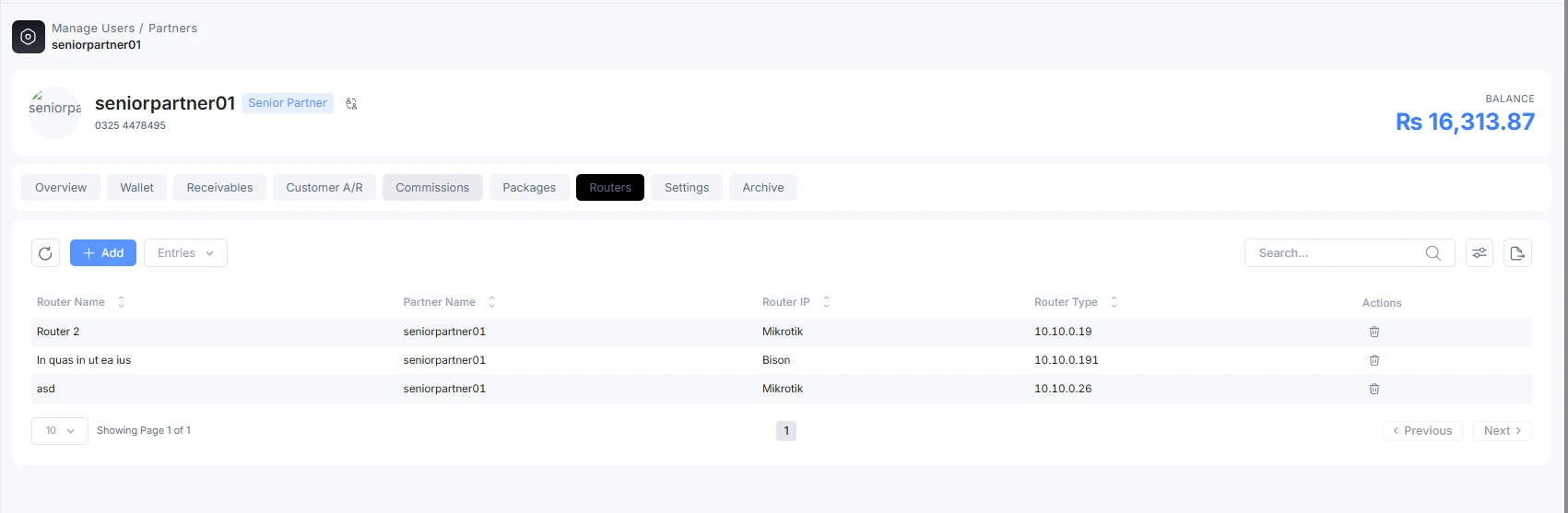
Assign a router (NAS)
A reseller needs at least one router (NAS) so their customers can authenticate on your network.
- Open the reseller's profile.
- Go to the Routers tab.
- Click Add, choose the router(s) to assign, and save.
Router assignment is an Admin capability. Once a router is assigned, the reseller's customers can be provisioned onto it.
Assign plans (packages)
Resellers can only sell plans that have been assigned to them.
- Open the reseller's profile and go to the Tariff Plans tab.
- Click Add to open the package assignment dialog.
The package assignment dialog
| Field | What it does | Notes |
|---|---|---|
| Package | The plan to assign. | Required. Pick from the plans available at your level. |
| Cost Price | The price this reseller pays for the plan. | Read-only , it comes from the level above and is fixed. |
| Selling Price | The price this reseller may sell at. | Required. Must fall inside the allowed range shown above the field. |
When you pick a package, the dialog shows the permitted bands , for example "Partner selling price from X to Y" and "Customer selling price from X to Y" , so you can see the floor and ceiling before you type. If the plan has profit limits disabled, a "no price limit" hint is shown instead and any price is accepted.
Package preview
From the plans list you can preview a package to see its full definition (speeds, burst, validity, pricing) before assigning or selling it, so you are not guessing at what the plan contains.
Blocking pending-changes check
Before you can unassign a package from a reseller, the system runs a safety check. If the reseller has customers with scheduled (next-cycle) plan changes that depend on that package, those changes would be orphaned , so the system lists them and blocks the removal until they are resolved. This prevents a reseller from losing a plan out from under a customer who is queued to move onto it.
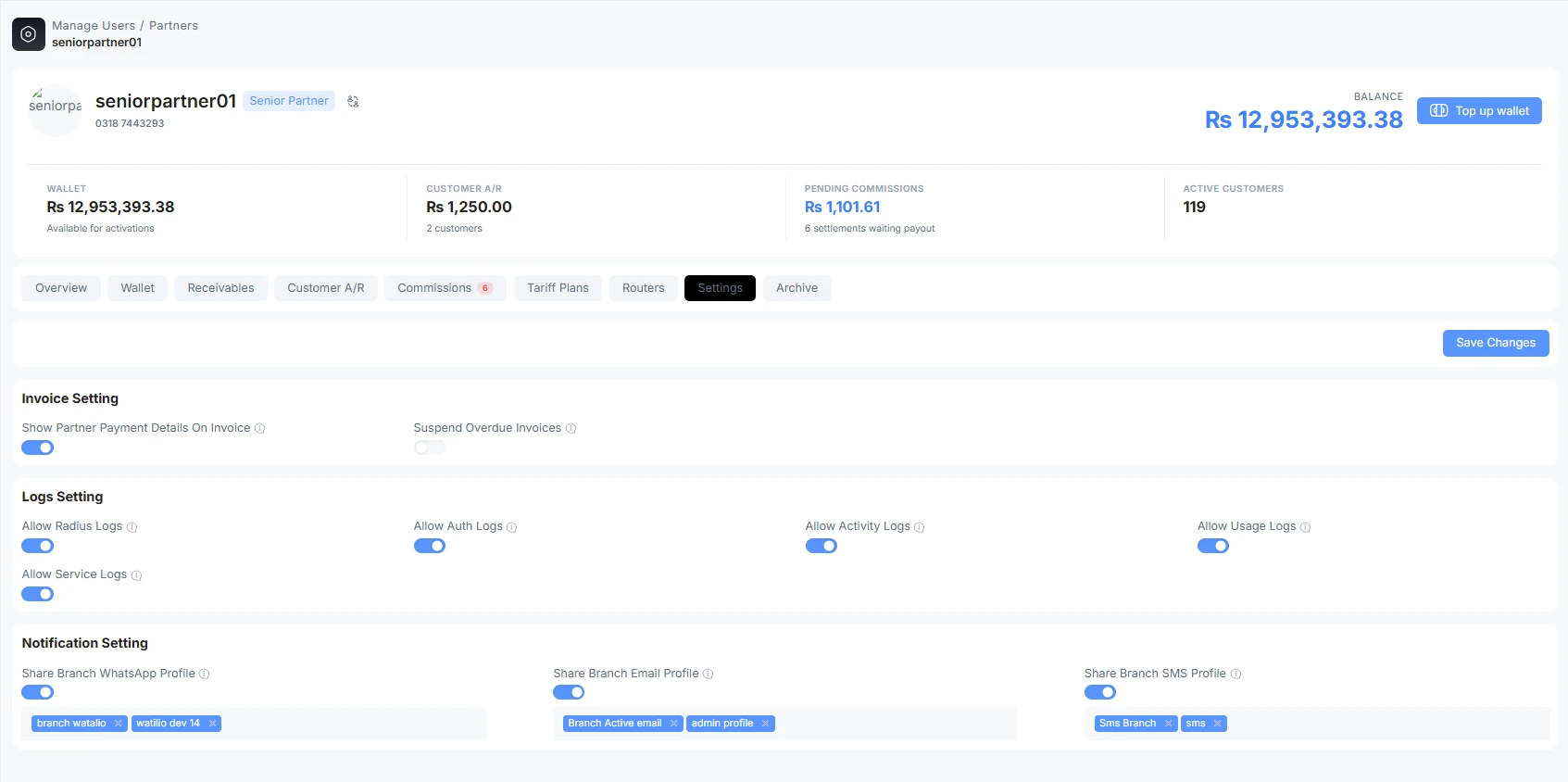
Partner settings
Each reseller has a Settings tab (Admin-managed) that controls how their customers are billed and what data they can see. The key groups are:
Invoice settings
| Setting | What it does |
|---|---|
| Auto Generate Invoice | When on, the system automatically raises renewal invoices for this reseller's customers on their billing cycle. When off, no auto-renewal invoices are generated for that reseller's customers , you (or they) must invoice manually. This is one of the gates required for auto-renew to run. |
| Show payment detail on invoice | Prints the reseller's own payment details on their customers' invoices. |
| Suspend on overdue invoices | Automatically suspends this reseller's customers when their invoices go overdue. |
Auto-renew needs every gate on. A customer only auto-renews when all of these are enabled: branch auto-renewal, the service's own auto-renew, the plan's "Auto Generate Invoice", and this partner-level "Auto Generate Invoice". Turning the partner flag off is a clean way to stop automatic renewal invoices for one reseller's whole customer base without touching the others.
Log visibility
Switches that let this reseller see specific logs for their own customers , RADIUS, authentication, activity, usage, service, and stale-session-cleanup logs. Off by default; turn on only what the reseller should be able to view.
Notification sharing
Lets the reseller send customer notifications through the branch's own messaging profiles instead of configuring their own. You can share WhatsApp, email, and SMS independently, and pick exactly which branch profiles are shared.
Edit and manage a reseller
Everything else about a reseller , profile edits, wallet, receivables, customer A/R, commissions, held prepayments, and archiving , lives on their profile tabs. See Partner Profile & Editing.
Troubleshooting
| Symptom | Likely cause | What to do |
|---|---|---|
| "Add Senior Partner" is missing | Only the Admin can create a Senior Partner. | Do it from the Admin account. |
| Selling price rejected | The price is outside the allowed range for that plan. | Enter a value inside the shown min–max band, or have the level above widen the range. |
| Can't remove a package from a reseller | Customers have scheduled plan changes that depend on it. | Resolve the listed pending changes first, then unassign. |
| A reseller's customers stopped auto-renewing | The partner "Auto Generate Invoice" flag (or another auto-renew gate) is off. | Turn the flag on in Partner Settings, and confirm the other auto-renew gates. |
| A reseller can't provision a customer | No router (NAS) is assigned to them. | Assign a router on the reseller's Routers tab. |

