Administration
The Administration area holds the branch-wide settings and reference data that the rest of AltRadius builds on: how your branch runs billing and expiry, how support tickets behave, and the localization data (countries, provinces, currencies, languages) that customer records and money formatting depend on. These are branch-level controls — they belong to your branch's own Admin authority, not to reseller partners.
Where to find it: Sidebar → Config → Administration (Branch Settings), and the Localization pages (Countries, State/Province, Currencies, Languages, Location Levels) under the same Config area.
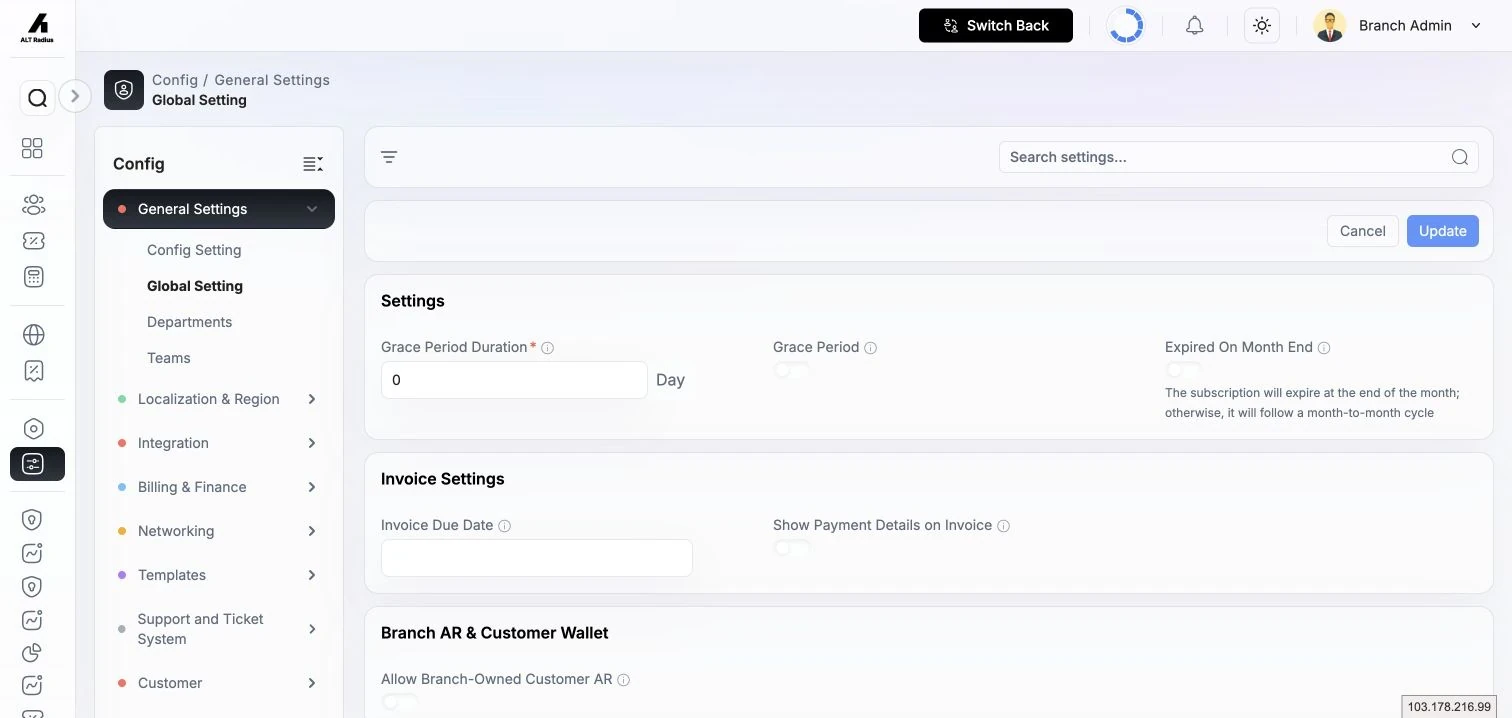
Branch Settings
Branch Settings is one page divided into sections. Changes apply to your whole branch. Most controls are simple on/off switches or number fields; the notes below explain what each one does at the branch level.
Grace period and expiry
| Setting | What it does |
|---|---|
| Expired On Month End | When on, services expire at the end of the calendar month rather than exactly one cycle after activation. |
| Grace Period Duration | The default service duration used when building a billing cycle. |
| Grace Period | Number of days a service stays usable after it expires before it is suspended. |
Invoice settings
| Setting | What it does |
|---|---|
| Invoice Due Date | Number of days after an invoice is generated before payment is due. |
| Show Payment Details on Invoice | Prints your branch's default payment account details on invoices for branch-direct customers. |
Branch A/R and customer wallet
| Setting | What it does |
|---|---|
| Allow Branch-Owned Customer AR | Lets the branch extend credit to its own direct customers whose wallet can't cover an activation or renewal, so the service still goes through and the shortfall becomes branch-owned receivable. |
Partner A/R and customer wallet
| Setting | What it does |
|---|---|
| Allow Partner-Owned Customer AR | Permits partners to carry their customers' receivables directly rather than the branch funding them. |
| Block Renewal With Partner AR | Stops auto-renewal for a partner's customer while that partner has outstanding receivables. |
| Auto-Apply Customer Wallet to Invoice | Automatically applies any available customer wallet credit to a new invoice at generation time. |
| Partner AR Grace Days | How many days an unpaid customer invoice may age before partner-A/R enforcement kicks in. |
| High AR Warning Threshold (%) | Shows a warning once a partner's outstanding A/R exceeds this percentage. |
Service policies
| Setting | What it does |
|---|---|
| Recharge On Deactivated Plan | Controls whether staff may recharge a service that sits on a deactivated plan. Options: Block (must migrate to an active plan first), Allow until expiry (only while the current cycle is still valid), or Allow always. |
Static IP release
| Setting | What it does |
|---|---|
| Release IP After Suspension | Days a suspended service keeps its static IP before it is auto-released back to the pool. Blank means never; 0 releases at the next sweep. |
| Release IP After Cancellation | Days a cancelled service keeps its static IP before auto-release. |
Scheduled jobs
These switches control the automated background jobs that run your branch's service lifecycle. Turning one off pauses that automation for the whole branch. Time-based jobs run once a day at the time you set; system jobs run on a fixed short interval.
| Job | What it does |
|---|---|
| Auto Renewal | Renews eligible services and generates their invoices at the Renewal Time you set. (Auto-renewal only fires when all the required gates are on — see below.) |
| Auto Expiry | Expires services that have passed their end. You can optionally use a fixed service expiry time for the day. |
| Auto Suspend | Suspends services once their grace period runs out, at the Suspend Time you set. |
| Auto Activation | Activates pending services that are due to start (runs on a short interval, roughly every few minutes). |
| Plan Allocation | Applies scheduled plan allocations at the Allocation Time you set. |
| Data Quota Check | Checks usage against quota and acts on customers who exceed it (runs on a short interval). |
| Expiry Reminder | Sends expiry-reminder notifications to customers ahead of their service ending. |
Auto-renewal needs every gate on. A service only auto-renews when branch Auto Renewal is on, the service itself has auto-renew enabled, its plan is set to auto-generate invoices, and — for partner customers — the partner is also set to auto-generate invoices. If any one is off, that service is renewed manually instead.
Customer self-service (plan changes)
Controls what customers can do to their own plan from the customer portal.
| Setting | What it does |
|---|---|
| Customer Cancel Cooldown (hours) | Within this many hours of a scheduled plan change, the customer can no longer cancel it themselves. |
| Allow Customer Self-Schedule (Upgrades) | Lets customers schedule a plan upgrade from the portal. |
| Allow Customer Self-Schedule (Downgrades) | Lets customers schedule a plan downgrade from the portal. |
| Allow Customer "Apply Now" Option | Lets customers apply a plan change immediately (prorated) instead of at the next cycle. |
| Auto-Cancel Stale Changes After (days) | Pending scheduled plan changes older than this are cancelled automatically. |
Business hours
Set your branch's opening hours per day (Monday through Sunday). Each day can be Closed all day or have one or more open time ranges (use Add range for split shifts). These hours drive support SLA timers — a day marked Closed pauses SLA timers for that whole day.
SLA pause statuses
Pause SLA when status is — pick the ticket statuses that should pause a ticket's SLA countdown (typically the "waiting on someone else" statuses such as pending-customer or pending-vendor). When a ticket moves into one of these, its SLA timers stop until it moves out.
Customer ticket timeline
Choose which ticket statuses appear as steps on the customer-facing ticket timeline, and in what order (each entry can be moved up, moved down, or removed). This is the progress view your customers see on their tickets.
Ticket assignment
| Setting | What it does |
|---|---|
| Default Assignment Strategy | How new tickets are routed: Manual only (left in triage), Partner owner (to the customer's partner), Least loaded (to the agent with fewest open tickets), or Admin first (to the branch admin). |
| Urgent Priority Override | When on, urgent tickets bypass the normal strategy for faster assignment. |
| VIP Customer Label | The customer label that grants VIP routing treatment; tag a customer with this label to prioritize their tickets. |
Ticket auto-acknowledgment
| Setting | What it does |
|---|---|
| Email Auto-Acknowledge | Sends an automatic acknowledgement email when a ticket arrives by email. |
| WhatsApp Auto-Acknowledge | Sends an automatic acknowledgement message when a ticket arrives by WhatsApp. |
Ticket lifecycle
| Setting | What it does |
|---|---|
| Auto-Close Resolved After (hours) | A resolved ticket auto-closes after this many hours with no further activity. |
| Reopen Window (hours) | How long after closing a customer can still reopen the same ticket. |
Major incidents
When many tickets report the same outage, AltRadius can cluster them under one major incident.
| Setting | What it does |
|---|---|
| MI Cluster Threshold (tickets) | How many related tickets it takes to raise a major incident. |
| MI Cluster Window (minutes) | The time window those tickets must fall within to count as a cluster. |
| MI Match Window (minutes) | How long incoming tickets are matched against an open major incident. |
| MI Child Reply Mode | How updates flow to the linked child tickets: Cascade (every parent comment pushes to children), Digest (periodic summary), or None (children handled manually). |
Customer satisfaction (CSAT)
| Setting | What it does |
|---|---|
| CSAT Token Expiry (hours) | How long a customer's satisfaction-survey link stays valid after it is sent. |
Custom prepaid
| Setting | What it does |
|---|---|
| Custom Prepaid Max Days | The longest custom prepaid period staff may set for a service. |
| Custom Prepaid Rounding | How the custom prepaid price is rounded: nearest 2 decimals, always round up, always round down, or nearest whole currency unit. |
Portal activity windows
Tune how far back the customer portal treats login/activity history as recent.
| Setting | What it does |
|---|---|
| Customer Portal Activity Window (days) | How many days of portal activity are considered when judging whether a customer is active. |
| Hot Retention Window (days) | How many recent days of portal activity are kept in fast (hot) storage. |
| Warm Retention Window (days) | How many additional days are kept in warm storage before aging out. |
The Support Module settings include an operator-facing OLT Integration Available switch. Enable it only for branches whose OLT integration is configured; it controls whether ticket views expose OLT-backed customer network information.
Countries
The country reference list feeds every place a country is chosen — customer addresses, provinces, and localization. Built-in countries ship with the system; you can add your own.
Where to find it: Sidebar → Config → Countries.
| Field | What it does |
|---|---|
| Name | The official name of the country. |
| Code | The ISO country code (e.g. US, GB, PK). |
You can add a custom country and edit or delete custom entries. Built-in countries are kept for reference and can't be removed. Use the Code filter to find one quickly.
State / Province
States and provinces hang off a country and are used in customer addresses.
Where to find it: Sidebar → Config → State/Province.
Pick a Country first; the province list is disabled until you do ("Select country first"). Then:
| Field | What it does |
|---|---|
| Name | The name of the state or province. |
| Code | A short code identifying it. |
| Country | The country this province belongs to (required). |
As with countries, you can add custom provinces and edit or delete your own entries.
Currencies
The currency list controls which currency your branch bills in. Currencies are supplied by the system; you enable the one you use.
Where to find it: Sidebar → Config → Currencies.
The list shows each currency's Name, Code (ISO 4217, e.g. USD, PKR), Symbol, and whether it is Active. Use Set Active on a row to make that the branch's currency. Filter by active state, currency code, or language to find one.
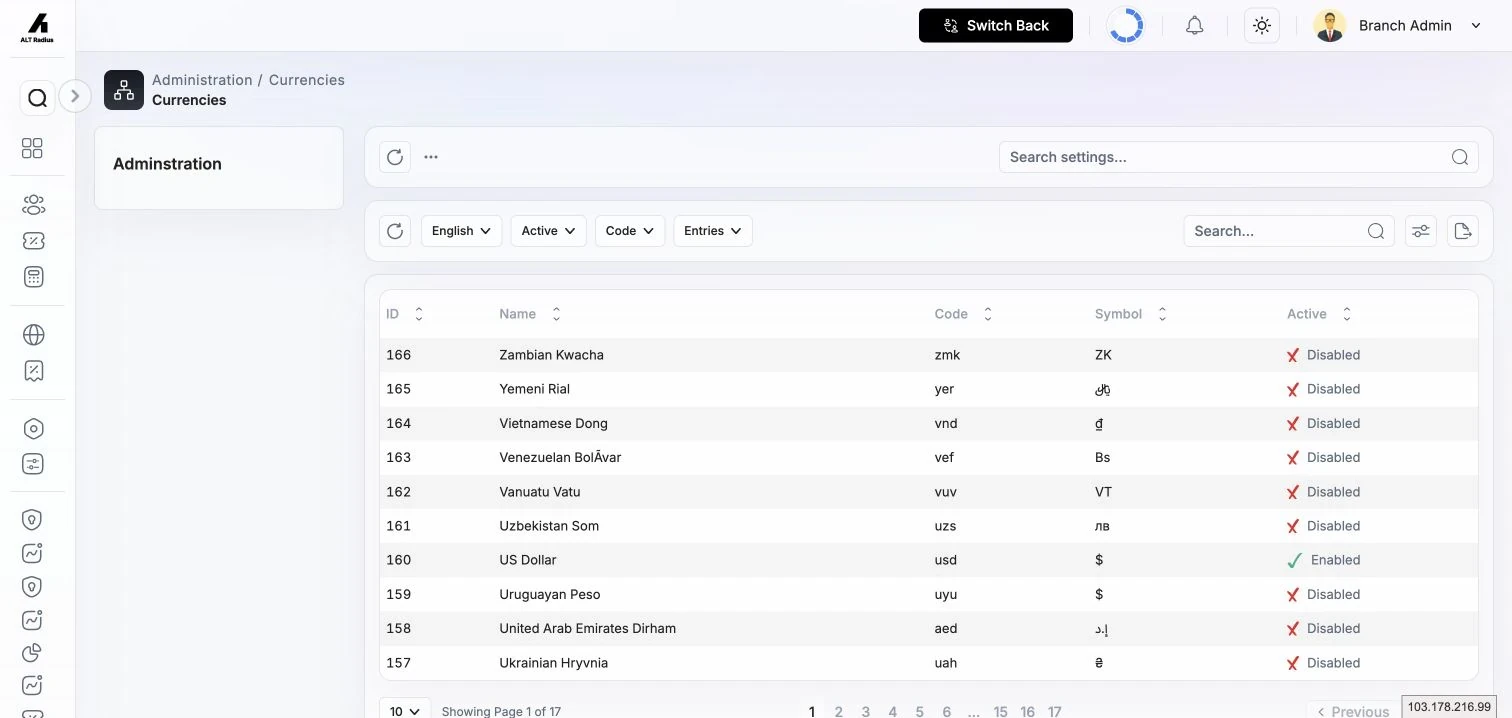
The platform can store multiple currency definitions, but each branch points to one active
currency_id. The list's active marker identifies that branch currency; it is not a multi-select.
Languages
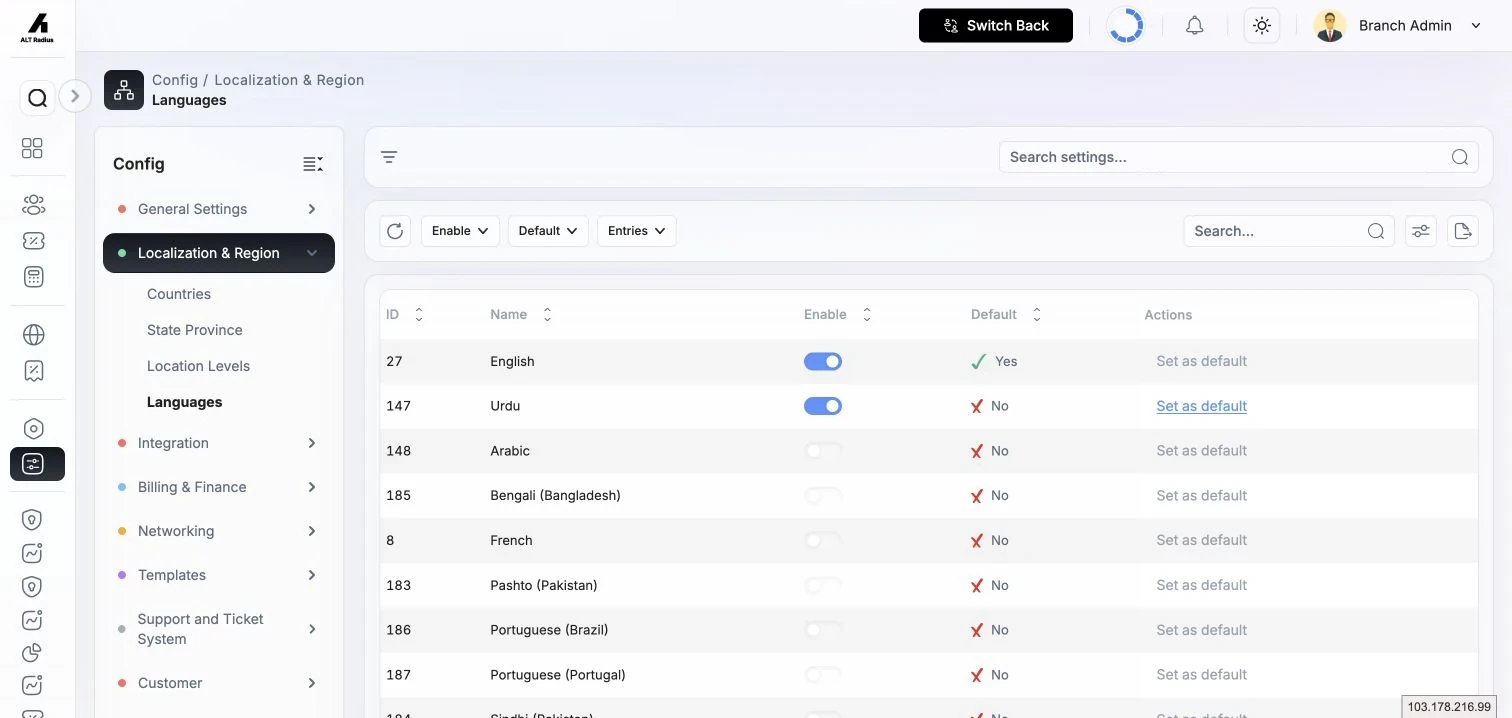
Languages control which interface languages your branch and its customers can use, and which one is the default. AltRadius supports right-to-left (RTL) languages such as Urdu and Arabic — the whole interface mirrors when an RTL language is the active one.
Where to find it: Sidebar → Config → Languages.
| Column / action | What it does |
|---|---|
| Name | The display name of the language. |
| Direction | The text direction: LTR (left-to-right) or RTL (right-to-left). |
| Enable | Turn a language on or off with the switch. Only enabled languages are available to users. |
| Default | Shows which language is the current default. |
| Set as default | Makes an enabled language the branch default. A language must be enabled before it can be set as default. |
To offer a new language: Enable it, then use Set as default if you want it to be the one new sessions start in. Filter the list by Enable or Default to review your setup.
Related
- Location Levels (the geographic hierarchy and coverage boundaries) has its own page — see Location Levels.

