Global Configurations
Applies to all editions
The Global Settings page holds system-wide configuration that sits above every branch. From here you white-label the Super Admin login, keep RADIUS accounting tidy, flush caches when the UI shows stale data, keep the MAC manufacturer database current, and reach the emergency kill switches.
Where to find it: Super Admin sidebar → Global Setting.
The page is view-only until you click Edit in the top action bar. Change what you need and click Save; the cache buttons, MAC sync, and emergency controls act immediately and do not need Save.
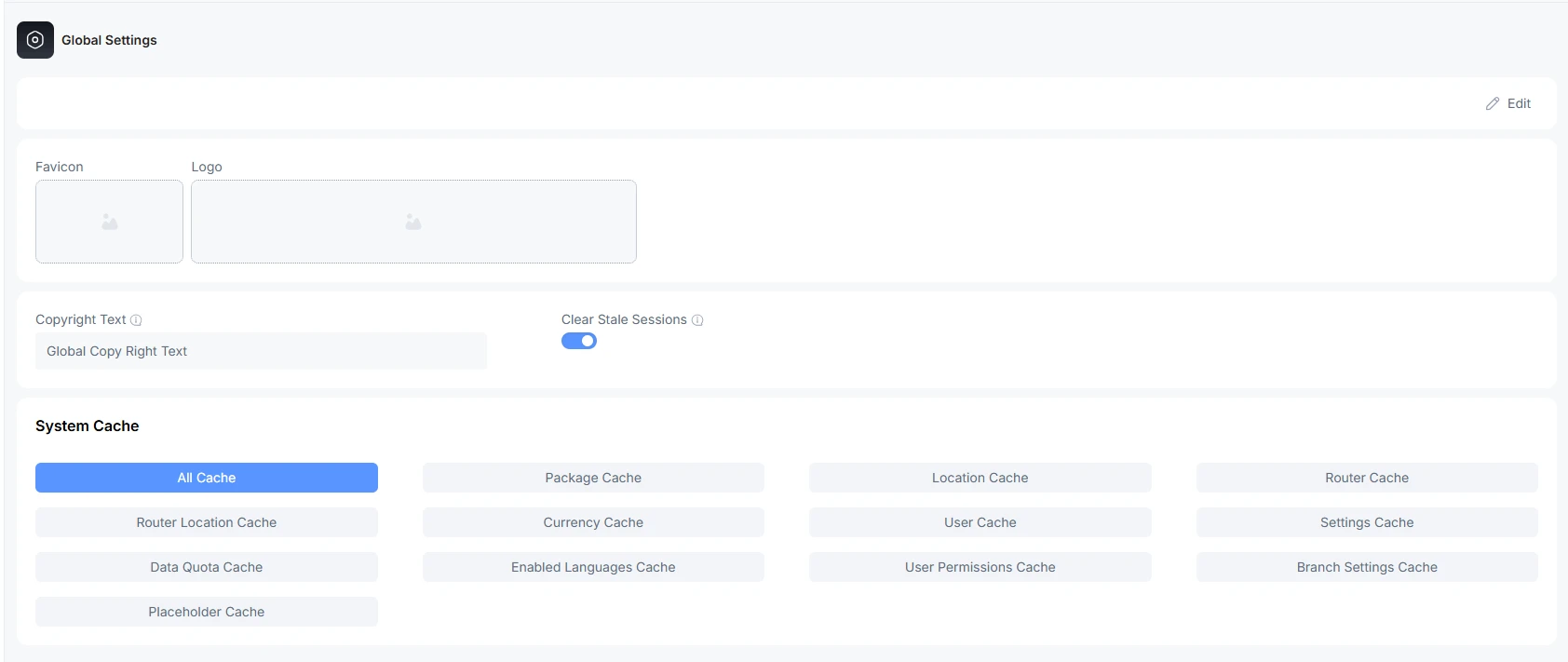
Branding
The branding block controls the visuals of the Super Admin login and system chrome — separate from the per-ISP branding you set on each ISP record.
| Field | What it does | Notes |
|---|---|---|
| Favicon | The small icon shown in the browser tab. | Image upload (JPG, PNG, GIF, or SVG, up to 2 MB). Saves as soon as you pick a file. |
| Logo | The logo shown in the header and on documents. | Same upload rules as the favicon. |
| Copyright Text | The copyright line shown in the footer. | Edit and Save. |

Clear Stale Sessions (toggle)
This is a RADIUS accounting toggle, not a web/login-session cleaner. It keeps your "who is online" numbers honest when a router loses contact with the CRM and never sends the session's stop record.
What it does when enabled. A scheduled background job runs on a regular cycle and, for each router that has an interim update interval configured:
- Finds sessions that look stale (the router stopped reporting on them).
- Queues a Packet of Disconnect (POD) for each one.
- The POD is sent to the router, which officially closes the session and writes a proper stop record.
When it is disabled, stale sessions can linger in the accounting data indefinitely, so customers may appear "online" on dashboards when they are not, and data-quota figures can drift because never-closed sessions keep accumulating time.
When to enable it: you have routers that occasionally lose contact with the CRM, your online-user counts drift higher than reality, or quota calculations look inflated by sessions that never closed.
When to be cautious: if a router's interim update interval is misconfigured (set too low), healthy sessions could be flagged stale and disconnected. Confirm each router's interim interval is realistic (typically in the 5–15 minute range) before turning this on.
You can review what the cleanup did on the RADIUS Health page (Accounting Freshness) and in the Stale Session Cleanup Logs. See Superadmin Operations → RADIUS Health.
Customer Portal Emergency Controls
The Global Settings page also hosts the Customer Portal Emergency Controls card — the global kill switches for the customer portal and for expiry reminders. These are documented in full, together with the per-branch controls, in Superadmin Operations → Emergency controls.
MAC OUI Database
The MAC OUI (manufacturer prefix) database powers device-vendor lookups in the MAC Lookup tool. The card shows the current Total Entries and Last Synced time, and a Sync Now button downloads a fresh copy in the background.
Use Sync Now after a long period without an update, or if MAC Lookup is failing to identify recent device manufacturers. Only one sync runs at a time.
System Cache
The System Cache block exposes buttons that flush specific groups of cached data. Caching speeds up the app by keeping frequently-used lookups in memory instead of hitting the database on every request.
Most caches clear themselves automatically when you edit the related data (for example, editing a plan clears the Package cache), so these buttons are mainly for troubleshooting when you suspect the UI is showing something out of date.
| Button | What it stores | Clear it when… |
|---|---|---|
| All Cache | Compiled config, routes, views, and every tagged cache below. | You just deployed code/config changes, or you are unsure which cache is stale and want a full reset. |
| Package Cache | Tariff plan data — speeds, plan actions, data allocations used during RADIUS authentication. | After editing plans, plan actions, or allocations, customers get the wrong speed/policy. |
| Location Cache | The geographic / area hierarchy. | After restructuring locations. |
| Router Cache | The router/NAS list — IPs, RADIUS secrets, ownership. | After adding/editing routers or changing which partner owns one. |
| Router Location Cache | The tree of locations served by each router. | After reassigning routers to different locations. |
| Currency Cache | Branch currency symbols/codes. | After changing a branch's currency, finance pages show the wrong symbol. |
| User Cache | Basic user lookups. | After bulk user imports/edits. |
| Settings Cache | System-level settings. | After changing system defaults. |
| Data Quota Cache | Per-customer remaining quota computed from accounting logs. | After manually adjusting accounting records, so quotas recalculate immediately. |
| Enabled Languages Cache | The languages turned on for a branch. | After enabling/disabling a branch language and the language dropdown is wrong. |
| User Permissions Cache | Role-based permissions for staff/partners. | After changing a role's permissions and users still see old access. |
| Branch Settings Cache | Per-branch configuration. | After editing a branch setting that isn't taking effect. |
| Placeholder Cache | Translated UI strings/labels. | After updating any translation or placeholder text. |
| Customer Usage Cache | Cached per-customer usage figures. | After adjusting usage data and the numbers look stale. |
| Router Usage Cache | Cached router usage charts. | After a router's usage graph looks out of date. |
| Ticket Cache | Cached support-ticket lookups. | After ticket data looks stale. |
| OLT Status Cache | Cached OLT device status. | After OLT status looks out of date. |
Rule of thumb: try the single, targeted cache first. Only fall back to All Cache if that doesn't resolve it.

