Credit Notes
Applies to all editions
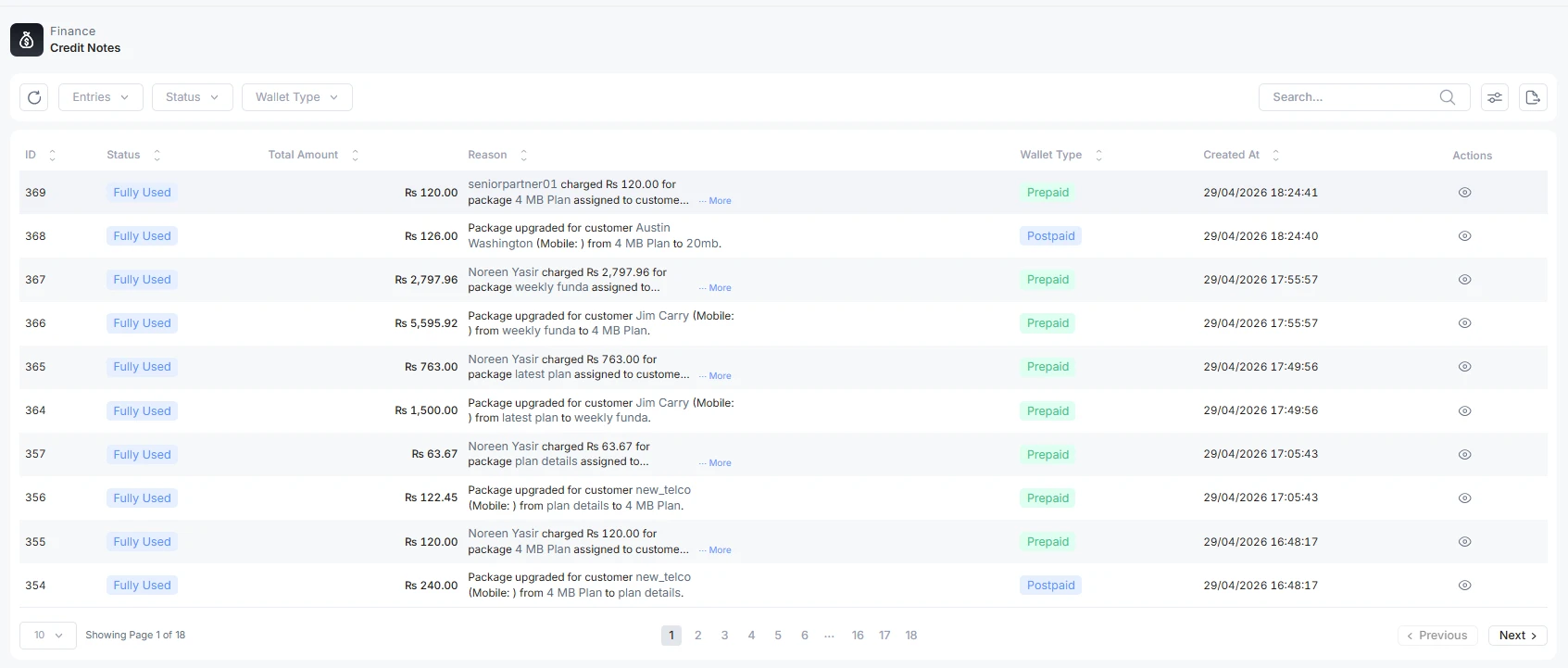
A credit note is credit your branch owes a customer , money you have promised back or written off against what they owe. The list is every credit note issued.
Where credit notes come from
Credit notes are usually created automatically by the system, and occasionally by hand:
Operator guide
A credit note is credit your branch owes a customer , money you have promised back or written off against what they owe. The list is every credit note issued.
Where credit notes come from
Credit notes are usually created automatically by the system, and occasionally by hand:
- Service cancellation , cancel an active service mid-cycle and the unused portion is credited.
- Plan change (downgrade) , move a customer to a cheaper plan mid-cycle and the difference is credited.
- Add-on cancellation , cancel a mid-cycle add-on and its remaining value is credited.
- Write-off , write off an amount as uncollectable; the branch absorbs the loss as a credit note.
- Manual issuance , an operator issues a credit for an adjustment or goodwill concession, with a reason.
Columns and statuses
Columns: ID, Status, Customer Name, Reference Number (CN-…), Used Amount,
Total Amount, Wallet Type, Reason, Created At, and Preview.
| Status | Meaning |
|---|---|
| Issued | Created; credit is available to be used. |
| Fully Used | All of the credit has been consumed. |
(There is no "partially used" status in the current product , a credit note is either Issued with a remaining balance or Fully Used.)
How a credit note is applied
For a customer credit note, the system consumes the credit automatically:
- Outstanding invoices first, oldest first (FIFO). The credit is applied to the customer's due invoices starting with the oldest, paying each down up to its due amount, moving on while credit remains.
- Then the wallet. Any credit left after all due invoices are cleared is deposited into the customer's prepaid wallet. (Cancellation refunds go straight to the wallet, bypassing the invoice sweep, so a refund does not silently settle an unrelated invoice.)
- Every step is logged, so the credit note's usage history shows exactly where the money went.
Credit notes issued to a partner or branch account are written straight to that wallet and marked Fully Used immediately , there is no invoice sweep.
Detail view and usage history
Preview (the eye icon) opens the credit note: who it was issued to, the date, the reason, and a summary of Total Credit / Used / Remaining. Below that, the Usage History breaks down where the credit has gone into two sections , Applied to Invoices (each invoice paid down, with amount and date) and Deposited to Wallet. If none has been used yet, it reads "No usage history yet , credit not yet applied."
Filter the list
Available filters: Entries, Status (Issued / Fully Used), Wallet Type, Search, and a Trashed toggle.