Add a Plan
Applies to all editions
A tariff plan is the complete definition of a service you sell: its speeds, IP pools, router shaping, billing cycle, price, the profit ranges resellers may add, and what happens to a subscriber when the plan expires, is disabled, or exceeds its data quota. Every customer service is built on a plan, so the plan is where you set the rules once and let the billing and RADIUS engines apply them to every subscriber automatically.
Only the branch (Admin) creates and edits plans. Resellers — Senior Partner, Partner, and Agent, which are equal-capability positions in the referral hierarchy — can see plans and assign them to their own customers, but they cannot change a plan's definition.
Where to find it: Sidebar → Tariffs → Internet.
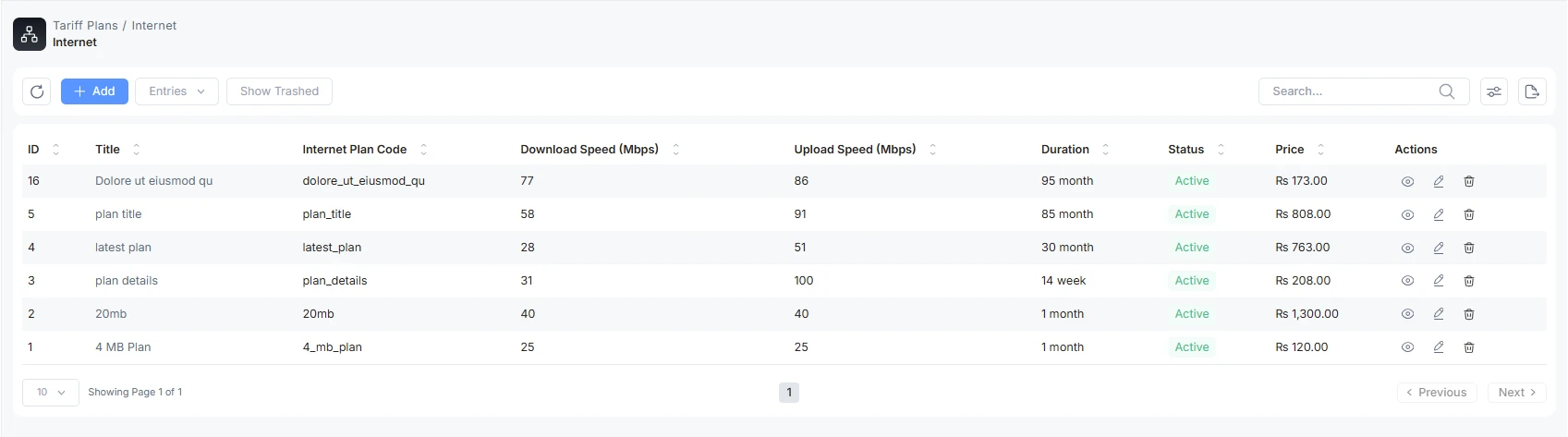
The plan list
The list shows every plan defined for your branch. From here you can preview a plan read-only, edit it, or delete it. A plan that is already assigned to a customer service cannot be deleted — the system blocks it and tells you the plan is in use.
Add a plan
Click Add to open the plan editor. The form is organized into cards, top to bottom. Work through them in order; the sections below match the on-screen cards.
Speed unit
At the top of the form is a Speed Unit control (Mbps / Kbps / KB/s). It only changes the unit that speed fields are shown and typed in — it does not change any stored value. Plan-level speeds are always stored in Mbps and Bison limits in Kbps regardless of the display unit you pick.
Basic Info
| Field | What it does | Notes |
|---|---|---|
| Active | Whether the plan can be used. | Only active plans can be assigned to new customers. Inactive plans stay in the list but are unavailable for new services. |
| Auto Generate Invoice | Lets the plan renew and re-bill its subscribers automatically at the end of each cycle. | This is one of the four gates that must all be ON for a service to auto-renew (see Auto-renew requires four gates below). Turning it off does not stop billing you do manually — it stops the automatic renewal invoice for this plan. |
| Title | The customer-facing plan name. | Required and unique. Use a clear convention, e.g. "Fiber 100 Mbps – Monthly". |
| Internet Plan Code | An internal identifier. | Auto-generated from the title (lower-cased, spaces become underscores) and read-only. Used internally for plan management. |
| Description | Free-text internal notes for your staff. | Optional. Not shown to customers. |
Internet Specifications (speed)
| Field | What it does | Notes |
|---|---|---|
| Download Speed | The plan's maximum download rate. | Required. Entered in the selected speed unit; stored in Mbps. |
| Upload Speed | The plan's maximum upload rate. | Required. Entered in the selected speed unit; stored in Mbps. |
IP Pool
| Field | What it does | Notes |
|---|---|---|
| IPv4 | Name of the IPv4 address pool the RADIUS server uses to assign addresses to subscribers on this plan. | Required. Must match a pool name that exists on your NAS/RADIUS setup. |
| IPv6 | Name of the IPv6 pool. | Required. Must match a pool name that exists on your NAS/RADIUS setup. |
Speed (guaranteed minimum)
The Guaranteed Speed setting defines the minimum bandwidth a subscriber is promised when the network is congested.
| Guaranteed Speed Type | What it does |
|---|---|
| None | No minimum guarantee is configured. |
| Fixed | You enter an absolute Guaranteed download Speed and Guaranteed upload Speed (in Mbps) that the subscriber always receives. |
| Relative | You enter a Guaranteed Speed limit as a percentage of the plan's max speed. |
Switching the type clears the fields that don't apply, so you only ever fill in the pair that matches your choice.
Burst
Burst lets a subscriber briefly exceed the plan speed when spare capacity is available, smoothing over short dips.
| Burst Type | Fields shown |
|---|---|
| None | No burst configured. |
| Fixed | Burst download limit, Burst upload limit, Burst Threshold download limit, Burst Threshold upload limit (all in Mbps), and Burst Time (seconds). |
| Relative | Burst Limit (% above base speed), Burst Threshold Limit (seconds), and Burst Time (seconds). |
The threshold values are the average-rate points that trigger or release burst; Burst Time is the averaging window in seconds. As with guaranteed speed, switching the burst type clears the fields that no longer apply.
Router Specific Attributes
Different NAS/router vendors accept different shaping attributes. This card lets you attach vendor-specific attributes to the plan. Each vendor has a checkbox — tick it to enable and configure that vendor's block; leave it unticked and nothing is sent for that vendor (the router applies its own defaults). All attributes here are optional.
MikroTik
| Field | What it does | Notes |
|---|---|---|
| Priority | Queue priority, 1 (highest) to 8 (lowest). | Lower-priority queues only get bandwidth after higher-priority ones are satisfied. Priority only works on child queues in a hierarchy; 4 is typical for standard customer traffic, 1–2 for premium/VoIP. |
Bison
The Bison block adapts to the QoS Type you choose. Common types: 1 (general policer), 2 (multi-policer — the default), 4 (DPDK QoS scheduler), 6 (DSCP policer). Any other positive integer is treated as a multi-policer vendor extension.
| Field | What it does | Notes |
|---|---|---|
| Shaper Engine ID | Routes the subscriber's traffic through a specific processing engine. | Vendor-specific integer. |
| Shaping Algorithm ID | Selects the shaping algorithm (e.g. token bucket vs strict shaping). | Vendor-specific integer. |
| Burst Bucket Size | The burst allowance the subscriber gets. | Vendor-specific. |
| QoS Map | Prioritizes traffic classes (e.g. voice over bulk download). | Optional. |
| QoS Type / Number of Policers / Number of Ports | Select the Bison engine mode and how many shaping tiers/ports apply. | Multi-policer mode reveals per-tier Ingress/Egress limits; the DPDK mode reveals port/profile pairs. |
| Ingress / Egress limits (per tier, in Kbps) | The download (ingress) and upload (egress) rate limits per policer tier. | Tier 1 falls back to the plan's Download/Upload speed if left blank; tiers 2–3 must be set explicitly. |
| Prefix Map ID | References a traffic-class prefix map defined on the Bison device. | The map is defined on the router, not here — this is a reference. |
Juniper (shown when a Juniper/ERX NAS is configured)
Juniper plans reference policy names that already exist on the Juniper BNG/MX/ERX device — AltRadius sends the name, it does not create the policy. You configure an ingress (upload) and egress (download) policy name for each service state: Active, Expired/cancelled, Blocked/suspended, and Data-quota-exceeded. If a non-active state's policy pair is left blank, a subscriber in that state is rejected (fail-closed) rather than left on the active policy.
Per-router pool overrides. Each vendor block can override the plan's IPv4/IPv6 pool for that NAS type only — useful when different vendors use different pool naming schemes. Leave blank to use the plan default pool.
Attributes Preview. Use the preview to see exactly what RADIUS attributes the plan will emit for each enabled router, so you can catch a mis-configured value before saving. A field the current configuration cannot emit is flagged with the reason.
Billing type
| Field | What it does | Notes |
|---|---|---|
| Billing Type | Prepaid — the customer pays before the service runs for the cycle. Postpaid — the customer is billed after the cycle. | Required. Prepaid and postpaid are handled by separate engines (wallet / partner-owned A/R for prepaid; outstanding due for postpaid). |
Duration settings
| Field | What it does | Notes |
|---|---|---|
| Duration | How many duration-type units one billing cycle lasts. | Required. Example: Duration 2 with Duration Type "week" = a 2-week cycle. |
| Duration Type | The unit for the cycle: day, week, month, year. | Required. |
Billing schedule (cycle anchoring)
By default a customer's cycle runs from their own activation date. The billing schedule card lets you instead anchor every subscriber on the plan to a fixed day of the month — the classic "everyone is billed on the 1st" model.
| Field | What it does | Notes |
|---|---|---|
| Use fixed billing day | Turns on calendar-anchored billing for the plan. | Only supported for monthly plans. Toggling it on an existing plan cascades the setting to every renewable customer service on the plan; the change takes effect at each customer's next renewal, current cycles are unaffected. |
| Expiry day | The day of the month each cycle ends on (1–31). | When a value over 28 lands in a short month, it clamps to that month's last day (e.g. 31 in February becomes the 28th/29th). A mid-month activation gets a partial first cycle ending on this day, then full monthly cycles after. |
| Prorate partial cycles | Whether the partial first cycle is charged pro-rata. | ON = the partial cycle is charged a prorated fraction of the plan price. OFF = the full plan price is charged even for a partial first cycle. |
| Prorate by | Whether proration is calculated by Daily or Hourly granularity. | Shown only when "Prorate partial cycles" is on. Hourly bills to the hour of activation; use it only if your operations need time-of-day precision. |
Preview cycles. With a fixed billing day configured, the Preview cycles button shows the first few cycles assuming activation today — including which one is partial — so you can confirm the anchoring behaves as expected before saving. The preview is calculated by the backend and persists nothing.
Price
| Field | What it does | Notes |
|---|---|---|
| Cost Price | The wholesale/branch cost of providing the plan. | Required. Used as the base for reseller profit ranges. |
| Selling Price | The price charged to the end customer. | Required. |
| Tax included | Whether tax applies to the selling price. | When on, pick a Tax or Tax Group. Turning it off clears the tax selection. |

Profit Limits (reseller margin caps)
Profit limits are governed by a master toggle: Enforce profit percentage limits on this plan. When it is off (the default for new plans), resellers may set any selling price for the plan. When it is on, the percentage matrix below it becomes active and resellers must price within the ranges you set.
The matrix sets minimum and maximum profit percentages at each step of the resale chain. Remember that Senior Partner, Partner, and Agent are equal-capability resale positions — the rows simply describe who sells to whom in the referral chain, not a difference in authority.
| Row | Fields | Meaning |
|---|---|---|
| Company → Senior Partner | Min / Max Selling Profit, Min / Max Customer Selling Profit | The margin range a Senior Partner may add when reselling to the next position, and the range when selling directly to a customer. |
| Senior Partner → Partner | Min / Max Selling Profit, Min / Max Customer Selling Profit | The Partner's resale range and direct-to-customer range. |
| Partner → Agent | Min / Max Customer Selling Profit | The Agent's direct-to-customer range (an Agent is the last position, so it only sells to customers). |
These caps keep resale pricing transparent and stop a reseller from over- or under-charging outside the band you allow. When the master toggle is off the matrix is hidden, but any values you previously entered are preserved and reappear if you turn it back on.
Expiration action
This card defines what happens to a subscriber when their plan expires (the cycle ended and they have not paid/renewed).
| Field | What it does | Notes |
|---|---|---|
| Action on Expiration | Continue — keep the subscriber connected at a reduced speed. Disconnect — cut the service off. | The action is applied by disconnecting the current session (Packet of Disconnect) and taking effect when the subscriber reconnects and re-authenticates. |
| IPv4 Pool Override / IPv6 Pool Override | Optional pools to move the expired subscriber into (e.g. a walled-garden pool). | Shown for the Continue action. Leave blank to keep the plan default pool. |
| Download Speed / Upload Speed | The reduced speed the subscriber is limited to after expiry. | Shown for the Continue action. |
How the change reaches the subscriber: AltRadius uses Packet of Disconnect (POD) only — there is no live CoA. When a plan/policy or state changes, the current session is disconnected and the new policy (reduced speed, different pool, or a full block) is applied when the subscriber's device reconnects and re-authenticates.
Disable action
The Disable action defines what happens when a service is manually blocked or suspended (as opposed to expiring on its own).
| Field | What it does | Notes |
|---|---|---|
| Action on Disable | Continue at a reduced speed, or Disconnect entirely. | Same POD-and-reconnect mechanism as expiration. |
| IPv4 Pool Override / IPv6 Pool Override | Optional pools for the disabled subscriber. | Shown for the Continue action. |
| Download Speed / Upload Speed | The reduced speed while disabled. | Shown for the Continue action. |
Data Quota
Defines what happens when a subscriber uses up the plan's data allowance.
| Field | What it does | Notes |
|---|---|---|
| Data Quota Volume | The data allowance in GB before the quota action fires. | Leave blank for an unlimited plan. |
| Data Quota Action | Disconnect — cut the subscriber off at the limit. FUP (Fair-Use Policy / Continue) — keep them connected at a reduced speed. | |
| IPv4 Pool Override / IPv6 Pool Override | Optional pools to move the over-quota subscriber into. | Shown for the reduced-speed action. |
| Download Speed / Upload Speed | The reduced speed applied after the quota is exceeded. | Shown for the reduced-speed action. |
Allocations (optional)
Allocations let you raise the subscriber's speed during specific days and time windows — for example, faster off-peak speeds at night. Add as many rows as you need with the + button.
| Field | What it does |
|---|---|
| Day | The day of the week the window applies to. |
| Start Time / End Time | The window during which the boosted speed applies. |
| Download Speed / Upload Speed | The speed granted during the window. |
The form rejects overlapping windows and requires the end time to be after the start time.
Auto-renew requires four gates
A customer's service only auto-renews when all four of these are on. If any one is off, the service will not generate a renewal invoice automatically:
- Branch auto-renewal — enabled at the branch level.
- Service auto-renew — enabled on the individual customer service.
- Plan "Auto Generate Invoice" — the toggle on this plan (Basic Info card).
- Partner "Auto Generate Invoice" — enabled on the owning reseller.
If a subscriber isn't auto-renewing, check all four before anything else.
Troubleshooting / FAQ
- A saved speed shows as "reduced speed" text or a raw value the form rejects. A legacy plan may have stored a speed with a unit suffix. Clear the field and re-enter the value, or ask an operator to run the speed normalizer.
- Save and Preview are disabled. One or more speed fields don't convert cleanly to whole Kbps (this affects Bison limits). A banner lists the offending fields — fix them and the buttons re-enable.
- A router preview says an attribute "cannot be emitted." The current configuration is missing a value that attribute depends on. The preview shows the reason; fill it in or disable the attribute.
- I can't delete a plan. It is assigned to at least one customer service. Reassign or cancel those services first.
- Turning on the fixed billing day didn't change existing customers' current bill. By design — the change takes effect on each customer's next renewal; the in-progress cycle is never altered.

