Add Location
Applies to all editions
AltRadius uses a geographic location hierarchy so your service area can be described the way your network is actually laid out — country, province, city, area, and sub-area. Once locations exist, you attach a customer to a location, scope a router (NAS) to the area it serves, and (for resellers) limit a partner to the customers in their own territory. Locations also power the coverage map: each location can carry a drawn service boundary that shows exactly where you sell service.
Think of it as a parent-child tree. A partner or router assigned to a city can work in every area beneath that city; one assigned to a single area can only work inside that area. You never have to use all five levels — build only as deep as your operation needs.
Where to find it: Sidebar → Config → Location Levels (under Localization).
The five levels
The hierarchy is fixed at a maximum of five levels deep. Each new location you add sits one level below its parent:
| Level | Default label | Typical use |
|---|---|---|
| 1 | Country | The top of the tree (e.g. Pakistan). |
| 2 | Province | A province or state (e.g. Sindh). |
| 3 | City | A city or large town (e.g. Karachi). |
| 4 | Area | A district, colony, or neighborhood. |
| 5 | Subarea | A block, street, or the smallest zone you track. |
You are not required to reach level 5, and the labels above are just the level names — the actual entries you create carry whatever names you type (for example a level-1 entry could be a university campus and level-2 its departments). The tree simply enforces that nothing nests more than five levels deep.
How locations are used
- Customer addresses. When you create or edit a customer, you pick their location from this tree. That ties the customer to a place on your network and on the map.
- Router (NAS) scoping. A router can be limited to the location it serves, so it only authenticates customers from its own area.
- Partner territories. A reseller partner assigned to a location can add and manage customers only within that location and the locations beneath it.
- Filters and reports. Customer lists and reports can be filtered by location so you can look at one city or area at a time.
- Coverage maps. A location with a saved boundary draws its real service area on the map, which is what the network/coverage views render.
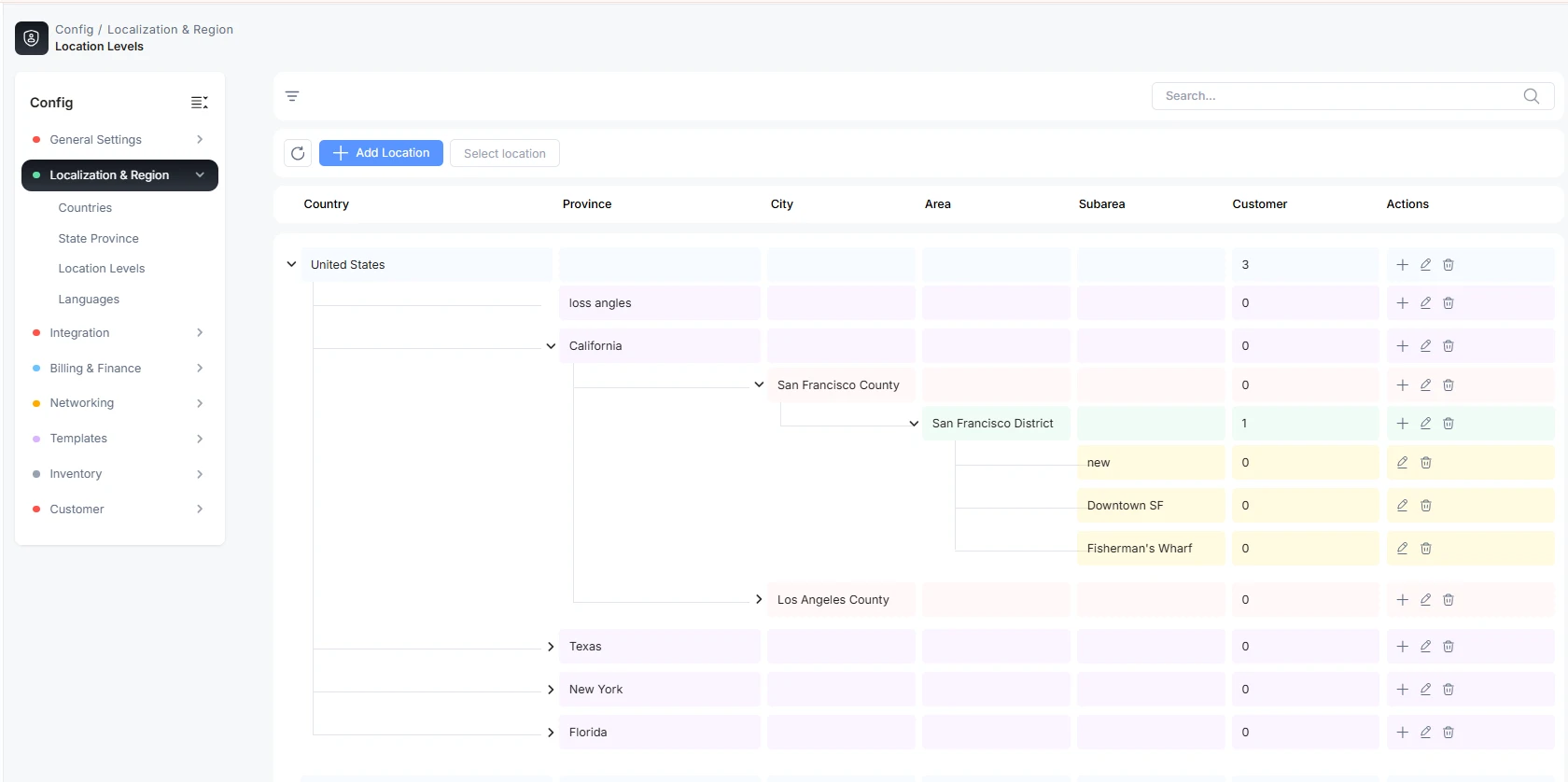
Build the location tree
The page shows your locations as an expandable tree. A count chip next to the Location header tells you how many top-level entries exist, and Expand all / Collapse all controls appear once there is any nesting.
Add a top-level location
- Click Add Location Level.
- Enter the Location Name (for a level-1 entry this is your country or the root of your tree).
- Click Save. The entry appears at the top of the tree.
Add a child location
- Find the parent in the tree and click its add (plus) icon.
- The dialog title reflects the level you are creating (for example "Add City" under a province). Enter the Location Name.
- Click Save. The child appears nested beneath its parent. Repeat to go deeper, up to five levels.
Location names must be unique under the same parent — you cannot add two areas with the identical name inside one city.
Rename or delete a location
- Rename: click the edit icon on a row, change the name, and click Update.
- Delete: click the delete icon and confirm. A location that is still in use — assigned to a customer, router, or partner — cannot be deleted; you will see a message that it is assigned. Reassign or remove what depends on it first.
Expand and collapse
The tree opens fully expanded so you can see the whole hierarchy at a glance. Use Collapse all to fold everything to the top level, Expand all to open it again, or click an individual row's chevron to toggle just that branch.
Draw a service boundary on the map
Any location can carry a map boundary — the polygon that represents the real area you serve there. Locations with a boundary show a Boundary assigned indicator in the tree.
Click a row's Set map boundary action to open the boundary editor. It has a live map on the right and three ways to define the shape, switched with the Search / Draw / Import tabs.
Search
Type at least three characters into Search city, colony, block, or area name. Matches appear as you type; pick one to preview it on the map. Each result is tagged so you know what you are getting:
| Result badge | What it means |
|---|---|
| Exact boundary | A real polygon outline is available and will be used as the boundary. |
| Approximate point only | Only a location pin exists — it centers the map but does not give a real shape, so you will usually finish by drawing or importing. |
Draw
Use the polygon tool on the map (top-right of the map) to trace the service area by hand — colonies, blocks, partner territories, or custom service zones. Click to place points and close the shape to finish. This is the most precise option when no exact boundary exists.
Import
Upload a boundary file you already have. Supported formats are GeoJSON or KML — click the drop zone to browse or drop the file onto it. The polygon from the file becomes the boundary.
Boundary states and saving
The footer always shows the current state:
| State | Meaning |
|---|---|
| No boundary yet | Nothing is drawn, searched, or imported. |
| Boundary ready to save | A shape is on the map but not yet saved. Click Save boundary. |
| Boundary saved | The boundary is stored. Click Done to close, or Remove boundary to clear it. |
Overlap warning. If your new boundary overlaps another location at the same level, saving is blocked with: "This boundary overlaps another location at the same level. Adjust one of the boundaries first." Fix one of the shapes so sibling areas do not cover the same ground.
Outside-parent warning. If a boundary sits outside its parent location, you get a softer notice — you may Save anyway after confirming the hierarchy is intentional, since some real territories legitimately spill past a parent's outline.
Troubleshooting
| Problem | Likely cause / fix |
|---|---|
| A location won't delete | It is assigned to a customer, router, or partner. Reassign those first, then delete. |
| "A location with this name already exists" | A sibling under the same parent already uses that name. Rename or place it under a different parent. |
| Can't nest another level | The tree is capped at five levels deep. |
| Search shows only "Approximate point only" | No exact outline exists for that place — switch to the Draw or Import tab to define the real shape. |
| Save is blocked by an overlap warning | Two same-level areas cover the same ground. Adjust one boundary and save again. |

