Transactions
Applies to all editions
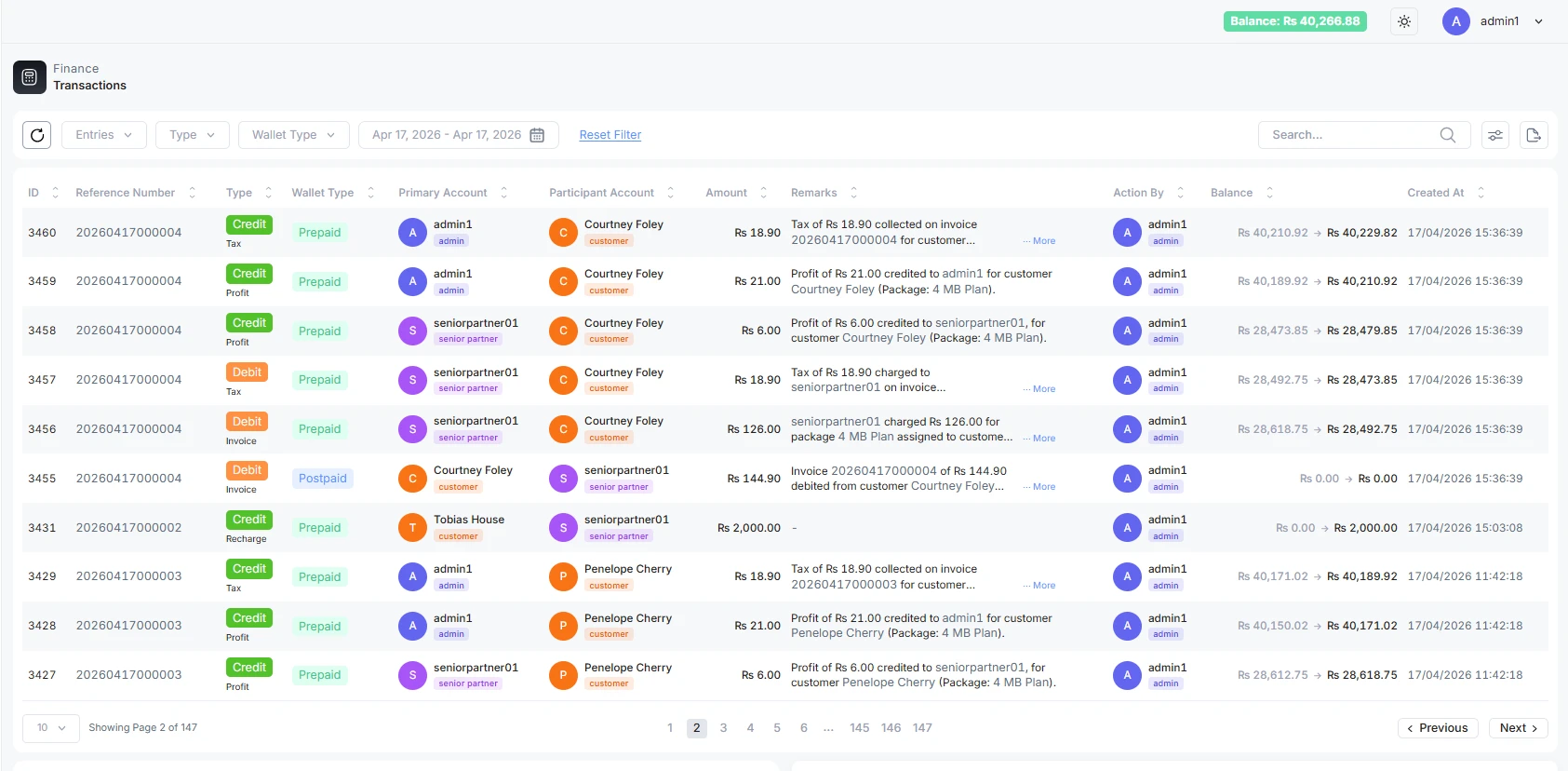
The Transactions page is your branch's money ledger , one row for every individual movement of money between two accounts. Where the Invoices, Payments, and Credit Notes pages each show one kind of document, Transactions is the underlying account-movement log that ties them together: a customer paying an invoice, a wallet being topped up, a partner commission being settled, a refund, an adjustment , each leaves a transaction row here that records how much moved, from which account to which, and what each account's balance became afterwards.
Use it when you need to trace exactly what happened to a balance, or to reconcile a customer or partner account movement by movement.
Where to find it: Sidebar → Finance → Transactions. Requires the transactions view permission granted to your role. Admins see the whole branch; partners see only movements that touch one of their own accounts.
Operator guide
The Transactions page is your branch's money ledger , one row for every individual movement of money between two accounts. Where the Invoices, Payments, and Credit Notes pages each show one kind of document, Transactions is the underlying account-movement log that ties them together: a customer paying an invoice, a wallet being topped up, a partner commission being settled, a refund, an adjustment , each leaves a transaction row here that records how much moved, from which account to which, and what each account's balance became afterwards.
Use it when you need to trace exactly what happened to a balance, or to reconcile a customer or partner account movement by movement.
Where to find it: Sidebar → Finance → Transactions. Requires the transactions view permission granted to your role. Admins see the whole branch; partners see only movements that touch one of their own accounts.
What a transaction row is
Every row is a single credit or debit against an account. Money always moves from one account to another, so each row names both sides and records the balance before and after the movement on the tracked account.
Rows are created automatically by the system as a side effect of other actions , recording a payment, issuing a credit note, topping up a partner wallet, running a settlement payout, and so on. You do not create transactions by hand from this page; you read them here to understand a balance.
Columns
| Column | What it shows | Notes |
|---|---|---|
| ID | Sequential transaction number | System-generated running number. |
| Reference Number | The document this movement belongs to | Links to the related Invoice, Credit Note, or Payment Receipt. Hover to see which kind it is. Blank if the movement has no source document (e.g. a manual adjustment). |
| Type | Credit or Debit badge, with the movement category underneath | Credit increases the tracked balance; Debit reduces it. The small grey line below the badge names the reason (see "Categories" below). |
| Wallet Type | Prepaid or Postpaid | Which side of the customer's account the movement affects. |
| Primary Account | The account the money moved from | Shown as an account chip; hover reveals the account hierarchy. |
| Participant Account | The account the money moved to | Same account chip. |
| Action By | The staff member who triggered the action | Shows a dash for purely system-generated movements. |
| Amount | The value that moved | Formatted in your branch currency. |
| Balance | The account balance before → after this movement | Hover each figure for "Balance before / after this transaction". This is what makes the ledger auditable. |
| Remarks | Description of the movement | Free-text or system-generated note. |
| Created At | When the movement was recorded | In your branch timezone. |
Categories
The category (the grey label under the Type badge) tells you why the money moved. Common values:
| Category | Meaning |
|---|---|
| Invoice / One-time invoice / Recurring invoice | A charge raised against the customer. |
| Payment / Invoice payment | A customer payment applied to a charge. |
| Credit note | A credit issued to the customer. |
| Recharge | A prepaid top-up. |
| Commission / Settlement to wallet | Partner earnings and settlement payouts. |
| Partner payment / Partner transfer / Transfer to child partner | Movements within the reseller hierarchy. |
| On credit | Wallet credit issued to a partner before payment. |
| Top up / Promotional credit / Opening balance | Funding a wallet or reserve. |
| Reversal / Refund to partner / Write-off offset | Corrections that undo an earlier movement. |
| Tax / Profit | The tax and margin portions of a charge. |
Categories beginning with Legacy (Legacy branch funded, Legacy auto top-up, Legacy unknown source) are historical movements carried over from before the current ledger model. They are informational only.
Filter the ledger
The filter row above the table lets you narrow what you see. Changing any filter reloads the table from the first page.
| Filter | What it does |
|---|---|
| Entries | Rows per page: 10, 25, 50 or 100. |
| Type | Show only Credit or only Debit movements (or all). |
| Wallet Type | Restrict to Prepaid or Postpaid movements. |
| Date range | Limit to movements recorded between two dates. |
| Search | Free-text search across the ledger. |
Below the table
- Total Transactions , a running total panel summarising the credit and debit volume for the current view.
- Recent Activities , a timeline of who created, edited, or deleted transaction records, for a quick audit trail.
Transactions vs. the Financial Activity feed
The Finance menu also has a Financial Activity page. The two look similar but answer different questions, and it is worth knowing which to reach for.
| Transactions | Financial Activity | |
|---|---|---|
| What a row is | One raw account-to-account movement (a single credit or debit). | One business event, grouped , a payment, a settlement, a credit note , with its linked movements folded in. |
| Level | Low-level ledger. Every balance change appears. | Higher-level, event-oriented feed. |
| Grouped by | Nothing , each movement stands alone. | Source type: Payment Receipt, Wallet Transaction, Credit Note, Partner Settlement, Held Prepayment. |
| Status column | None (movements are final). | Yes , a lifecycle status whose meaning depends on the source (payment settlement state, payout/clearing state, prepayment state, or wallet movement category). |
| Summary tiles | Total credit / debit volume. | Payments received, wallet debits, wallet credits, credit notes, orphan settlements, held prepayments. |
| Use it to | Reconcile a single account balance step by step. | Scan what has been happening across the branch and drill into the event behind it. |
Where to find the feed: Sidebar → Finance → Financial Activity. Its filters are Entries, Source (the event type), and a date range; a row can expand to show the linked movements underneath it (e.g. a payment that also created a partner settlement and a wallet credit).
Troubleshooting / FAQ
- A row has no Reference Number. Not every movement comes from a document , manual adjustments, opening balances, and some transfers have no source invoice/receipt, so the link is blank.
- The From/To accounts look reversed for a refund. They are correct: a reversal moves money the opposite way to the original, so the accounts swap sides compared with the payment it undoes.
- A partner cannot see a movement I can. Partners only see transactions that touch one of their own accounts; branch-internal movements are visible to branch staff only.
- I want the story, not the raw entries. Use Financial Activity for an event-level view; use Transactions when you need every individual balance change.

