Service Logs
Applies to all editions
The Service Logs page is the lifecycle history of your customers' service plans. Every meaningful change to a service , activation, renewal, suspension, expiry, block, cancellation, plan change , lands here as a dated entry, with the reason, a description, the billing cycle it applied to, and who performed it. Where Activity Logs cover all record changes across the CRM, Service Logs are focused specifically on what happened to each customer's internet service over time.
Use it to answer questions like: When was this plan activated? Why was this customer suspended, and by whom? Which cycle did this change fall in? What is the full timeline of this service?
Where to find it: Sidebar → Logs → Service Logs.
Operator guide
The Service Logs page is the lifecycle history of your customers' service plans. Every meaningful change to a service , activation, renewal, suspension, expiry, block, cancellation, plan change , lands here as a dated entry, with the reason, a description, the billing cycle it applied to, and who performed it. Where Activity Logs cover all record changes across the CRM, Service Logs are focused specifically on what happened to each customer's internet service over time.
Use it to answer questions like: When was this plan activated? Why was this customer suspended, and by whom? Which cycle did this change fall in? What is the full timeline of this service?
Where to find it: Sidebar → Logs → Service Logs.
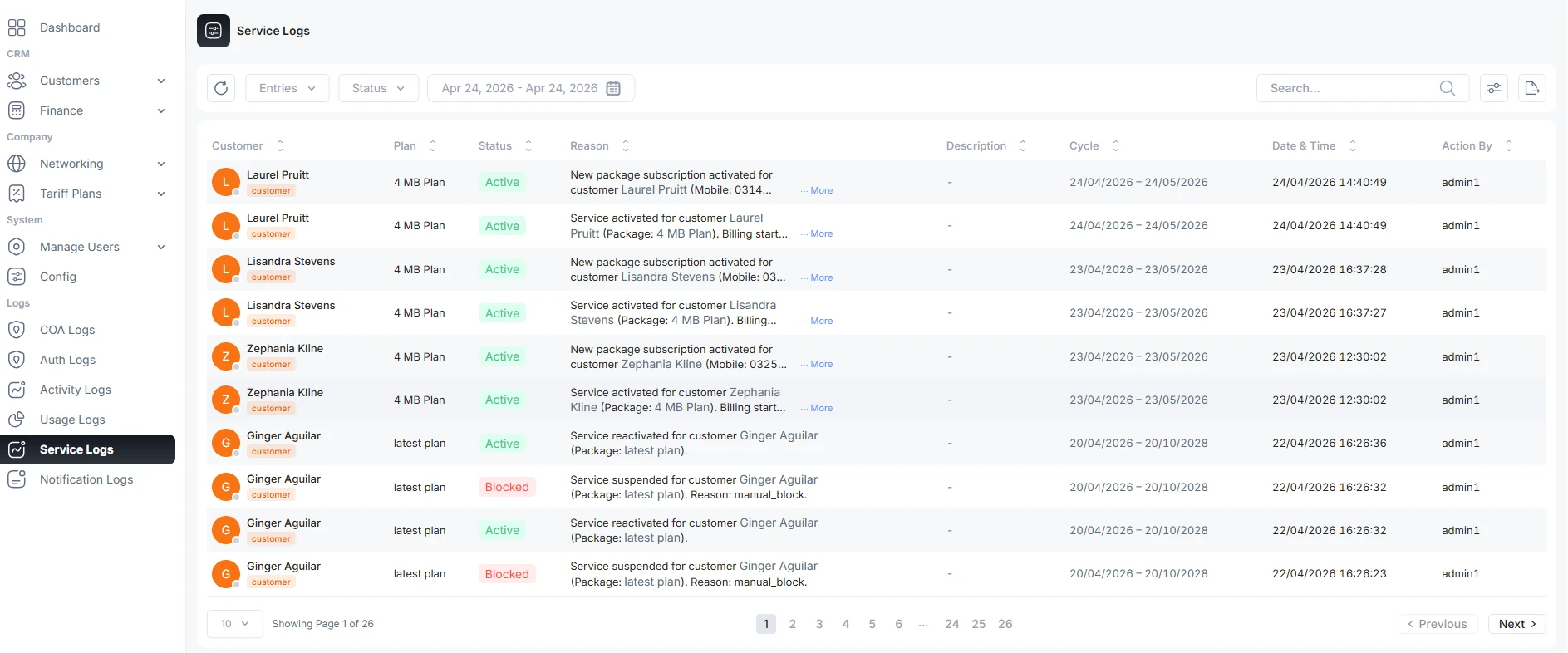
What each column shows
| Column | What it shows | Notes |
|---|---|---|
| Customer | The customer whose service the entry is about. | Links to the customer with an online indicator. |
| Plan | The tariff plan on the service at that point. | |
| Status | The service status recorded by the event (colour-coded badge). | See the status table below. |
| Reason | Why the change happened. | May carry formatting/links for context. |
| Description | A fuller note about the event. | |
| Cycle | The billing cycle window (start – end) the event applied to. | Shows "-" when not tied to a cycle. |
| Date & Time | When the event was recorded. | Branch timezone. |
| Action By | The operator or system actor who caused the change. | Shows "-" for automated events. |
Service statuses
| Status | Meaning |
|---|---|
| Active | The plan is live and the customer can connect. |
| Pending | The plan is scheduled to take effect (for example, on the next cycle) and is not yet active. |
| Suspended | Service is temporarily cut off, typically for non-payment; it can be reactivated. |
| Expired | The service reached its end date and lapsed. |
| Blocked | An operator has manually blocked the service. |
Status filters come from the server. An installation can show additional statuses when a newer service workflow adds them.
Filter the list
| Filter | What it does |
|---|---|
| Entries per page | 10, 25, 50, 100. |
| Status | Show only services in a chosen state (Active, Pending, Suspended, Expired, Blocked). |
| Date range | Limit entries to a chosen period. |
| Search | Free-text search across the log. |
Why Service Logs matter
- Complete service history , activations, suspensions, renewals, and plan changes for every customer in one timeline, so any team member can understand a customer's service at a glance.
- Faster support and troubleshooting , the past record of a service shortens problem resolution and reduces back-and-forth with the customer.
- Transparency , every entry names the actor and the time, so it is clear who changed what and when.
- Better decisions , the record of interruptions and plan movements informs future decisions about the customer and the product.
Troubleshooting / FAQ
- A customer was suspended and you need to know why and by whom. Filter to that customer (via search) and read the entry's Reason, Description, and Action By.
- A plan change shows as Pending, not Active. The change is scheduled for a later point (often the next cycle) and has not taken effect yet. The Cycle column shows the window it will apply to.
- There is no export or print button. This page is view-only , filter and read on screen.

