Partner Settlements
Applies to all editions
This tab is the running account of money moving between the branch and its partners as a result of customer activity. Every settlement has a type and a direction.
Types:
| Type | Meaning |
|---|---|
| Commission | Earned by a partner when they activate a customer plan. |
| Reimbursement | The branch collected a customer payment on a partner's behalf and owes it back. |
| Clawback | A previously earned commission that must be reversed , e.g. after a mid-cycle downgrade or cancellation, or a reversed payment. |
Operator guide
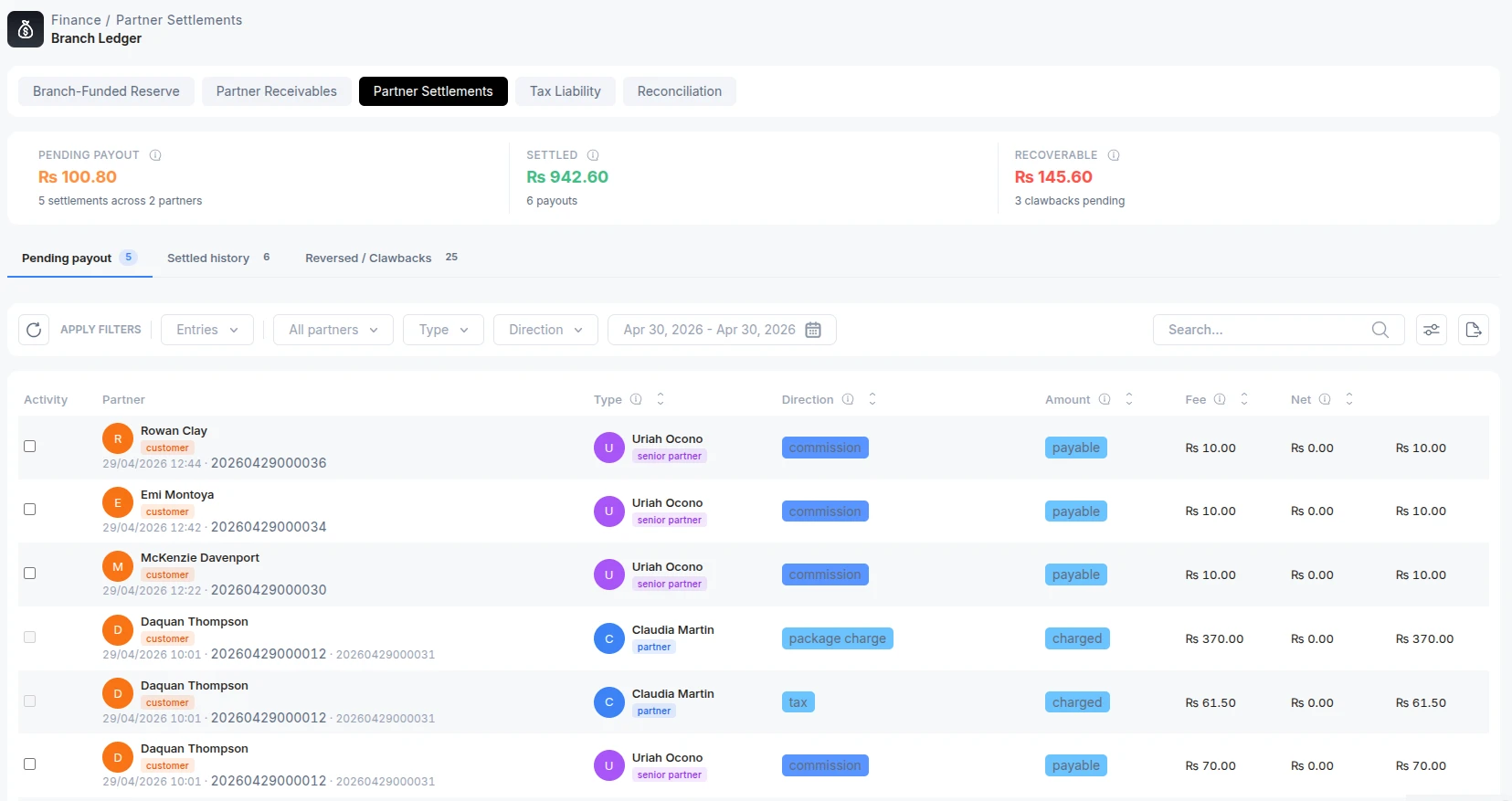
This tab is the running account of money moving between the branch and its partners as a result of customer activity. Every settlement has a type and a direction.
Types:
| Type | Meaning |
|---|---|
| Commission | Earned by a partner when they activate a customer plan. |
| Reimbursement | The branch collected a customer payment on a partner's behalf and owes it back. |
| Clawback | A previously earned commission that must be reversed , e.g. after a mid-cycle downgrade or cancellation, or a reversed payment. |
Directions: Payable (branch owes the partner), Collected (branch is holding the cash), Charged (applied to the partner), Recoverable (the partner now owes the branch back).
Four KPI tiles show Pending payout, Settled, Recoverable, and Net payable (pending minus recoverable , negative means partners owe the branch on balance). Sub-tabs split the rows into Pending payout, Settled history, Recoverable clawbacks, Recovered, Written off, and Reversed. Each row shows the customer/invoice/receipt it came from, the partner, the type and direction, and the gross amount, gateway fee, and net (what the partner actually receives).
Filter by partner, type, direction, and date range.
Pay out pending settlements (with netting preview)
On the Pending payout tab, tick the settlements to pay (a payout is per-partner, so a selection is limited to one partner) and click Review & confirm. Choose a method:
- Wallet , the net amount is added to the partner's wallet immediately; no proof needed.
- External , a cash or bank payout; you record method, account, mode, a reference number, and optional notes as proof.
Before you confirm, a netting preview shows the plan the branch will apply: it takes the partner's open clawbacks (oldest first) and nets them against the pending payout, capped at the pending amount. You see the gross Pending payout, the Netted clawbacks (itemised per customer), the Net paid the partner will actually receive, and what Stays recoverable afterwards. Confirming records the payout, marks the settlements Settled, credits the wallet (if the wallet method was chosen), and moves the netted clawbacks to Recovered , all in one step.
Recover clawbacks
On the Recoverable clawbacks tab, select clawbacks (again per-partner) and click Recover clawbacks. Choose how the branch gets the money back:
| Method | What it does |
|---|---|
| Debit partner wallet | Pulls the total from the partner's wallet (may go negative and net against future commissions). |
| Record cash collected | The partner returned cash outside the system; the wallet is untouched and you record proof. |
| Write off | The branch gives up collecting; no money moves, and you record a reason. |
Recovered clawbacks leave the Recoverable bucket immediately.