Router Dashboard
Applies to all editions
AltRadius turns your RADIUS accounting data into usage dashboards so you can see how much traffic your network is carrying — across all routers on the Routers list page, and per-device on each router information page. ISPs use these to size inventory and capacity: which NAS devices are near their limits, which areas consume the most data, and which customers are the heaviest users.
Where to find them:
- All routers: Sidebar → Networking → Routers — the data-usage chart below the router list.
- One router: Sidebar → Networking → Routers → Preview → the Data Usage and Customer Usage charts.
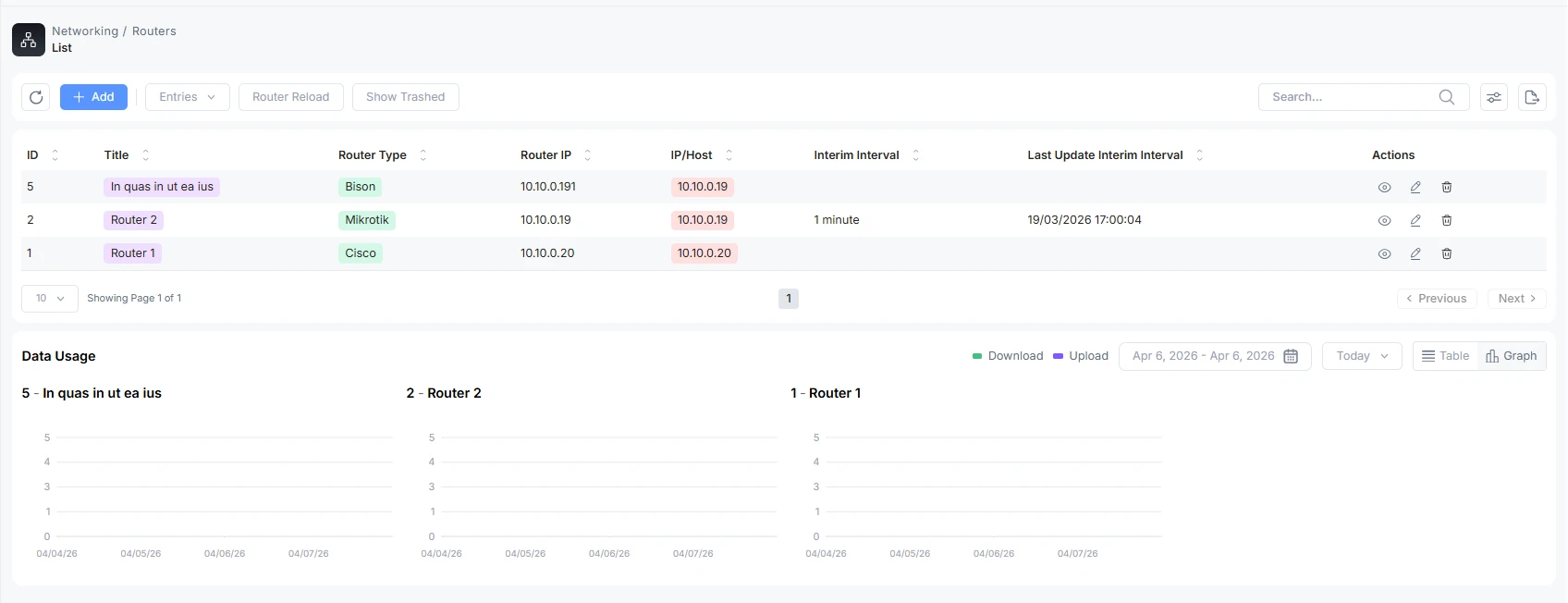
The data-usage chart
Every usage chart plots upload and download volume over time. The legend marks the two series (download and upload). You can read the same data two ways using the mode switch in the chart header:
| Mode | What you see |
|---|---|
| Graph | A time-series chart of upload/download volume — good for spotting trends and peaks. |
| Table | The same figures broken out row by row (typically month-wise), with totals — good for exact numbers and copying values out. |
On the Routers list page the chart aggregates usage across your branch; each router's contribution is shown so you can compare devices. On a single router's page the chart is scoped to that device only.
Choosing a time range
Two controls set the window the chart covers:
- Date-frequency dropdown — pick a preset period (the available presets come from your branch's configured date filters). Choosing a preset resets any custom range.
- Date range picker — pick an explicit start and end date. When you do, the dropdown shows Custom to indicate a hand-picked window.
The chart opens on a data-aware default: rather than showing an empty window, it lands on a period where this router (or your branch) actually has usage data, so you see something useful on first load. Very large ranges are automatically capped to keep the chart responsive.
Use Reset filter (which appears once you've changed the window) to return to the default data-aware range.
Customer usage
On a router's information page, the Customer Usage chart ranks the customers connected through that NAS by how much data they've used over the selected period, showing each customer's name. It shares the same graph/table modes and the same date controls as the data-usage chart. Use it to identify the heaviest users on a specific device.
Online customers
The router list surfaces how many customers are currently connected through each NAS, drawn from live RADIUS sessions. Use this alongside the usage charts to tell the difference between a router carrying heavy traffic from a few sessions versus one serving many customers at once.
How to use these dashboards
- Capacity planning — watch the per-router totals over a month or quarter; a device trending toward its throughput ceiling is a candidate for an upgrade or for moving customers off it.
- Hot spots — compare routers to find the areas/locations pulling the most data.
- Heavy users — use Customer Usage to find the customers driving load on a given NAS.
Troubleshooting
| Symptom | Likely cause / fix |
|---|---|
| Chart looks empty | The selected window has no accounting data. Use Reset filter to jump back to the data-aware default, or widen the range. |
| A custom range shows less than expected | Accounting only exists from when the router started reporting; ranges before that are naturally empty. |
| Numbers differ between graph and table | They shouldn't — the table is the same data itemised. If they differ, refresh the page; the two views read the same source. |

