Activity Logs
Applies to all editions
The Activity Logs page is the audit trail for your branch. It records who did what, to which record, and when , every create, update, delete, and restore performed through the CRM. Use it to track staff and partner actions, review changes to customer and billing records, investigate a dispute, or confirm exactly when and by whom a setting was changed.
Each entry is presented as a timeline, grouped by day, so you can read down the branch's recent history at a glance and expand any entry to see the precise before-and-after values.
Where to find it: Sidebar → Logs → Activity Logs.
Operator guide
The Activity Logs page is the audit trail for your branch. It records who did what, to which record, and when , every create, update, delete, and restore performed through the CRM. Use it to track staff and partner actions, review changes to customer and billing records, investigate a dispute, or confirm exactly when and by whom a setting was changed.
Each entry is presented as a timeline, grouped by day, so you can read down the branch's recent history at a glance and expand any entry to see the precise before-and-after values.
Where to find it: Sidebar → Logs → Activity Logs.
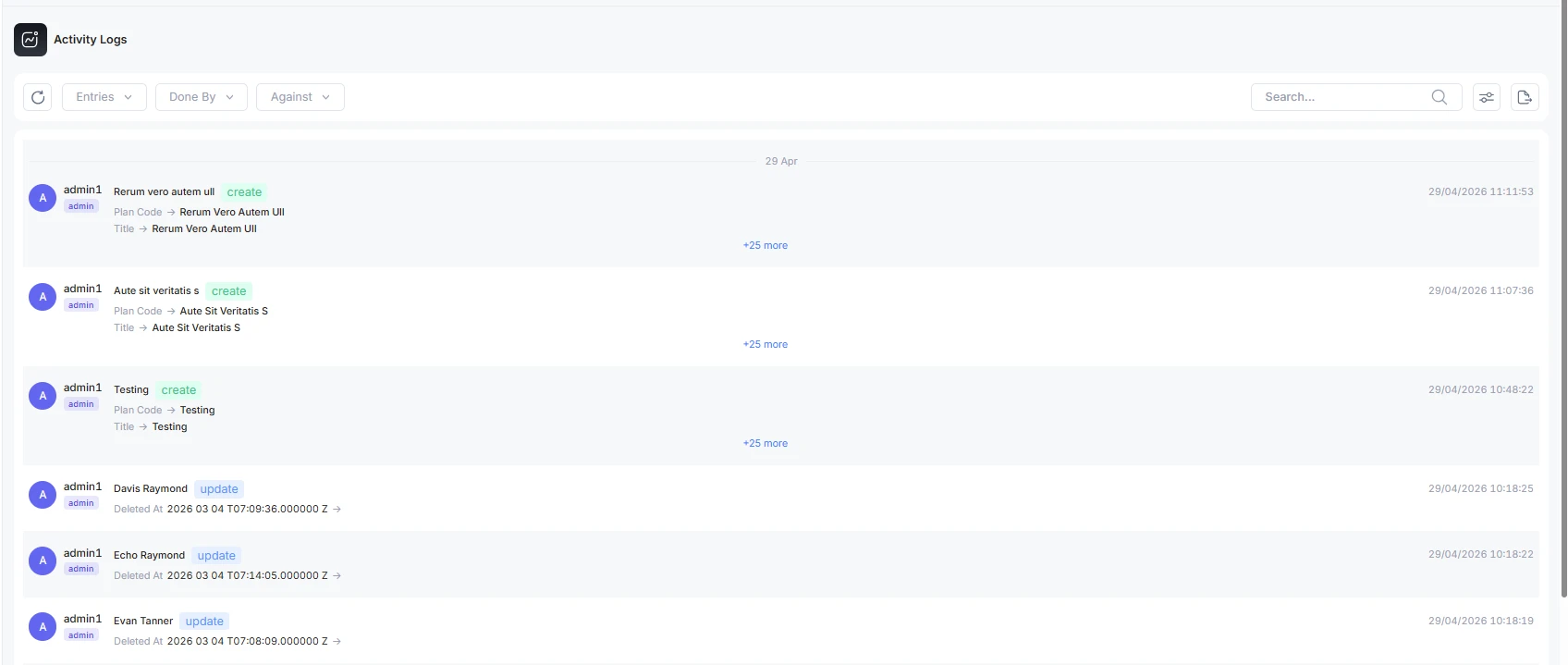
What each entry shows
| Element | What it shows |
|---|---|
| Actor (Done By) | The person who performed the action , name, role, and avatar. Staff members are marked as such. |
| Subject (Against) | The record the action affected. When possible it links straight to that record. |
| Event badge | The kind of change: create (green), update (blue), delete (red), or restore (yellow). |
| Changes | For updates, the fields that changed shown as old value → new value. The first two changes are shown inline; use +N more to expand the full set. |
| Time | When the action happened, in your branch's timezone. Entries are grouped under day headers (Today, Yesterday, and earlier dates). |
Filter the list
| Filter | What it does |
|---|---|
| Entries per page | 10, 25, 50, 100. |
| Done By | Narrow to a single actor , a staff member, a partner, or another user. Searchable. |
| Against | Narrow to actions taken against a particular subject. Searchable. |
| Search | Free-text search across the log. |
What the Activity Log gives you
- Accountability , every change is tied to a named actor and a timestamp.
- Faster troubleshooting , when a record looks wrong, the log shows what changed and who changed it, so you can trace a problem to its source instead of guessing.
- Auditing and reviews , a durable record for finance reconciliation, disputes, and compliance checks.
- Security oversight , unusual or unexpected activity stands out against the normal timeline.
Troubleshooting / FAQ
- A change happened but nobody remembers making it. Filter Done By to the suspected actor, or Against to the affected record, then read the old → new values on the matching entry.
- There is no export or print button. This page is view-only , filter and read on screen.

