Activate a Customer Service
Applies to all editions
A customer record on its own does not put anyone online. The service is the live internet subscription: it ties the customer to a tariff plan, opens a billing cycle, and (once active) lets the customer authenticate through RADIUS and connect. This page covers adding a service, activating a future-dated one, recording the first payment, blocking and unblocking, and what each service status means.
Each customer holds one service. If a service already exists, the Add Service button is not offered — you manage the existing one instead (recharge, change plan, cancel).
Where to find it: Sidebar → CRM → Customers → open a customer → Add Service (or the Add Service action on the customer row).
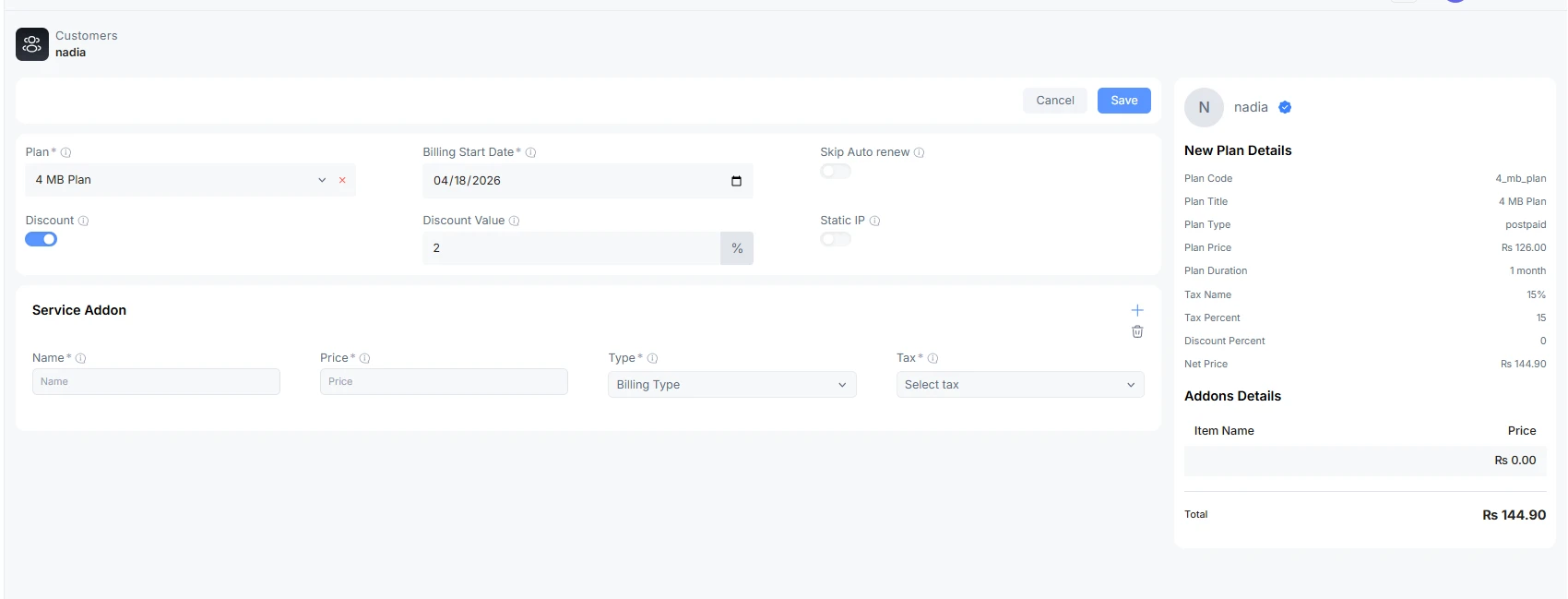
Add a service
- Open the customer and choose Add Service.
- Pick the Plan. The dropdown lists only the plans available to the customer's owner — for a partner-owned customer, that is the plans in the partner's catalogue. The plan you pick decides whether the service is prepaid or postpaid; there is no separate billing-type switch.
- Set the Billing Start Date (see the next section for future-dating).
- Optionally set a custom price or a discount, turn on auto-renew, assign a static IP, and add any add-ons (all covered below).
- Choose Save.
Fields on the Add Service form
| Field | What it does | Notes |
|---|---|---|
| Plan | The tariff the customer subscribes to. | Required. Filtered by the customer's owner (partner catalogue for partner-owned customers). Prepaid vs postpaid is inherited from the plan. |
| Billing Start Date | The day billing — and the service — begins. | Defaults to today. Can be set to a future date to create a Pending service (see below). Cannot be back-dated. |
| Custom Price | Overrides the plan's default price for this customer. | Optional, permission-gated. Pre-fills with the plan's default price. Cannot be set below the partner wholesale price. Has an optional reason field for the audit log. Mutually exclusive with Discount — turning one on clears the other. |
| Discount | Applies a percentage discount to the plan price. | Optional. Mutually exclusive with Custom Price. |
| Custom Prepaid Period | Lets you set a non-standard number of days for the first prepaid cycle instead of the plan's normal duration. | Prepaid plans only, permission-gated, and only when the Billing Start Date is today. If you pick a future start date the option disappears — custom prepaid periods can only be used when activating today. Sub-fields: Days, an auto-calculated Expiry Date preview, and an optional Reason. |
| Auto Renew | When on, the service renews itself at the end of each cycle. | Off by default. Auto-renew only actually fires when all four renewal gates are on — see the renewal documentation. |
| Static IP | Assigns a fixed IPv4 address instead of a dynamic one. | Optional. Opens a searchable IP picker (type at least two characters). See the warnings below. |
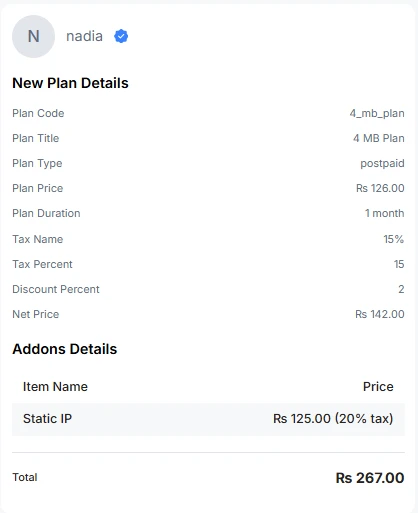
| Add-ons | Extra billable items on the service (e.g. a static-IP charge, equipment). | Optional. Each add-on has a name, price, billing type (recurring / fixed / one-time) and optional tax. |
RADIUS username and password are not set on this form — they are generated for the service and are managed from the customer's Information area, as part of editing the customer.

The static IP picker and its site warnings
When you turn on Static IP, the picker loads the addresses available to this customer, grouped by the network site that serves them. Two advisory warnings can appear:
- Site could not be determined. "Couldn't determine this customer's network site from their location — showing all branch IPs. Verify the chosen IP is routable where this customer connects." You can still pick an address, but confirm it is reachable from where the customer is connected.
- Site has no IPv4 pools. "This customer's Network Site has no static IPv4 pools linked to it. Add the IPv4 network to that Network Site before assigning a static IP." Link a pool to the site first, then return here.
Partner A/R exposure warning
If you are adding a service for a partner-owned customer and that partner's outstanding customer-receivables have crossed the configured warning threshold, a badge appears on the form: it names the partner, shows their current exposure percentage against the threshold, and advises you to confirm the partner can collect before you activate more credit. It is a warning, not a block — you can still save.
Future-dated (Pending) services
Set the Billing Start Date to a future date and the service is created in Pending status. A pending, future-start service has no billing cycle yet and cannot authenticate — the customer is rejected by RADIUS and stays offline until the service activates. On the service page a pending service shows a note that session and network details will appear once it is activated.
There are two ways a pending service becomes active:
- Automatically, when its billing start date arrives (a scheduled job activates due services in the branch timezone). This requires branch auto-activation to be enabled.
- Manually, by editing the pending service, setting its Billing Start Date to today, and saving. If the plan is prepaid and you have the permission, you can also set a custom prepaid period at this point.
On activation the status changes from Pending to Active, the first billing cycle opens and starts immediately, and (if a cycle with a payable invoice was created) the record-payment dialog appears.
The record-payment dialog after saving
When saving a service opens a new billing cycle that produces a partner-collected receivable, a dialog opens so you can record the payment straight away. The context is detected automatically (first-time activation, recharge, plan change, or a prepaid↔postpaid conversion) and the wording adapts.
The dialog carries the invoice number and amount due (read-only) and asks for a payment method, account, mode, and the amount collected. Overpayment is allowed and lands as wallet credit.
- Record payment posts the payment and settles the invoice.
- Skip just closes the dialog. Nothing is charged — the invoice stays open as a receivable (A/R) on the customer, to be collected later.
When the dialog does not appear: for branch-direct customers (no partner receivable to collect), when the owner has no payment methods configured, or when the invoice belongs to a closed period. If the system meant to show the dialog but could not build it, you will see a toast telling you the invoice was recorded as a receivable so you can collect it later from the billing tab.
Block and unblock a service
From the service page you can Block an active service. Blocking rejects the customer's RADIUS authentication and disconnects any live session with a Packet of Disconnect (POD), so the customer goes offline immediately. The service status becomes Blocked.
Unblock reverses it: the service returns to Active and the customer can authenticate and reconnect again.
Block/Unblock is an administrative on/off switch for a working service. It does not apply to a Cancelled service — a cancelled service is finished, and you win the customer back with Recharge/Renew, not by unblocking.
What each service status means
| Status | What it means | Can the customer connect? | What to do |
|---|---|---|---|
| Pending | Created but not yet activated — usually a future-dated service with no cycle yet. | No (a future-start pending service is rejected by RADIUS). | Wait for the start date, or activate manually by moving the start date to today. |
| Active | Live, with an open billing cycle. | Yes, unless it is blocked. | Nothing — this is the normal running state. |
| Expired | The cycle ended and the service did not renew (auto-renew off, a gate off, or a failed renewal). | No, unless the plan applies a reduced-speed policy at expiry. | Renew the service to restore full connectivity. |
| Blocked | An operator manually blocked it. | No. | Unblock to restore service. |
| Suspended | Held because of an overdue balance. A suspended service that passes its due date still expires. | No. | Collect the overdue amount, then renew/recharge to resume. |
| Cancelled | Ended permanently; add-ons, scheduled changes and future cycles removed. | No. | Cannot be unblocked — use Recharge/Renew to start the customer again. |
Troubleshooting / FAQ
- "Customer Service already exists." Each customer holds a single service. Manage the existing one (recharge, change plan, cancel) instead of adding another.
- The Custom Prepaid Period toggle disappeared. You picked a future Billing Start Date (or a postpaid plan). Custom prepaid periods are only available when activating a prepaid service today.
- I can't turn on both Custom Price and Discount. They are mutually exclusive by design — pick one.
- A newly created future-dated service can't get online. That is expected — a pending, future-start service cannot authenticate until it activates on its start date.
- "Activate this service first." You tried to recharge or change the plan of a pending service. Activate it (move the start date to today) before those actions become available. </content> </invoke>

