Branch Funded Reserve
Overview
The Branch Ledger is a structured financial system that separates and tracks different types of branch and partner transactions across dedicated pages, such as reserves, receivables, settlements, tax, and reconciliation.
It ensures accurate accounting by assigning each financial action to its correct category, maintaining clarity, control, and consistency in all financial operations.
Branch-Funded Reserve
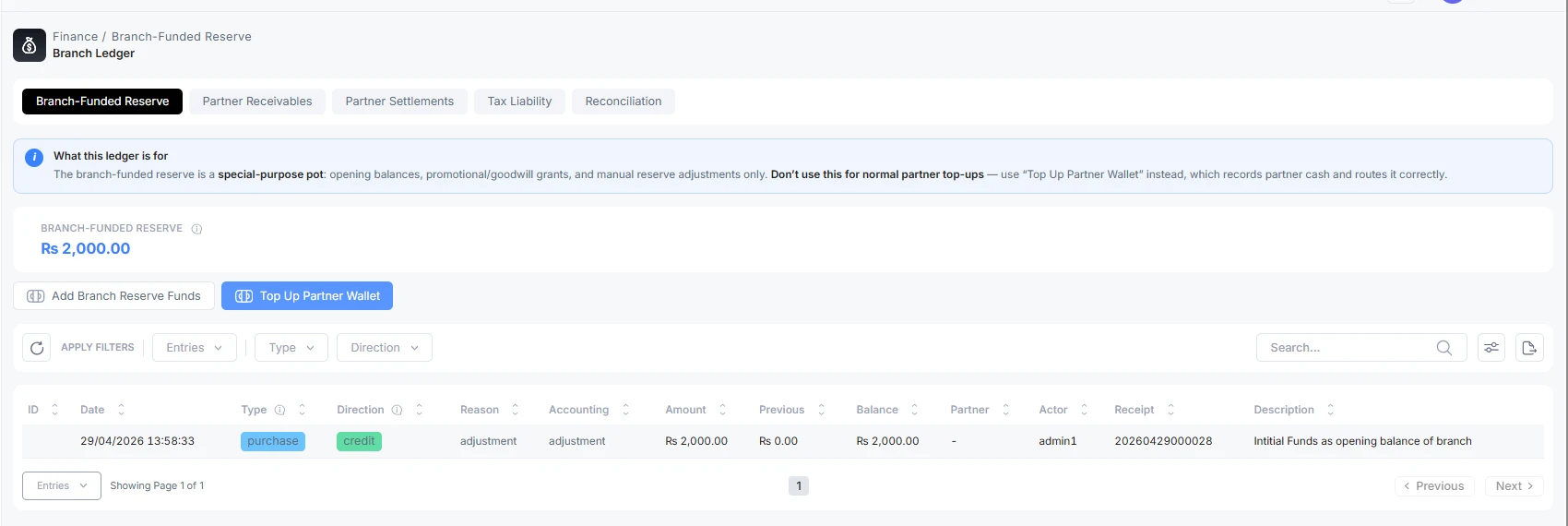
On the branch-funded reserve page, an admin can perform two functions.
-
Add Branch Reserve Fund
-
Recharge the Top Wallet of the Senior Partner/Partner/Agent
How to Add Branch Reserve?
In ALT Radius, after logging in to the branch admin. Go to the Finance section. Then the Branch Ledger. Click on Add branch Reserve
Fill out the form
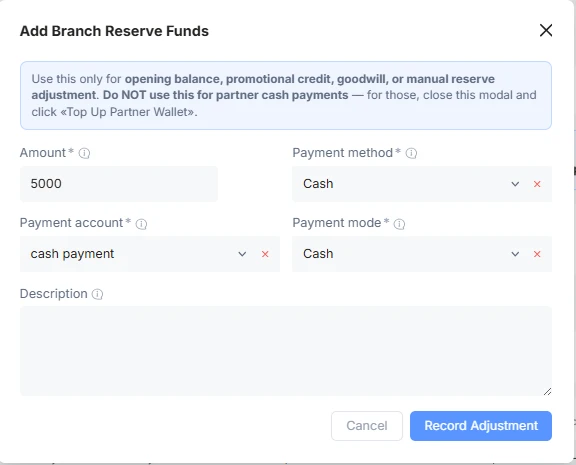
-
Amount: The amount reserved for branch use
-
Payment Method: The type of transaction, whether cash or bank transfer
-
Payment Account: The payment account name defined in ISP CRM
-
Payment Mode: The payment type is online, cash, bank transfer, or other means
-
Description: The reserve fund is dedicated to what purpose
Use Case of Branch Funded Reserve
Use the Branch-Funded Reserve when the branch itself funds or corrects a reserve balance.
Examples:
-
Opening reserve balance during setup.
-
Promotional credit campaign.
-
Goodwill credit after a service dispute.
-
Manual correction approved by finance.
Opening Balance
-
The branch starts with a reserve of $1,000.
-
Record a $1,000 opening balance. The reserve balance becomes $1,000.
Promotional Credit
-
The branch approves a $200 promo reserve for customer acquisition.
-
Record $200 as promotional reserve funding. Use notes such as “Spring promo reserve.”
Goodwill Credit
-
The branch decides to absorb $50 because of a service issue.
-
Record $50 as goodwill or a manual adjustment according to branch policy.
Manual Correction
-
A previous reserve entry was recorded incorrectly.
-
Record a correcting adjustment with a clear description. Do not hide the correction by changing unrelated workflows.
Common Mistakes in Branch Reserve Funds
-
Using reserve to add partner wallet credit.
-
Using reserves to settle partner commissions.
-
Leaving vague notes such as “adjustment” without business reason.
-
Treating the reserve as cash collected from partners.
TopUp Partner Wallet
Use this option to record partner wallet funding, receivable settlement, or trusted on-credit issuance.
How to Add TopUp Partner Wallet?
This tab is used to add balance to the partner's wallet. Three forms of wallet credits are available here.
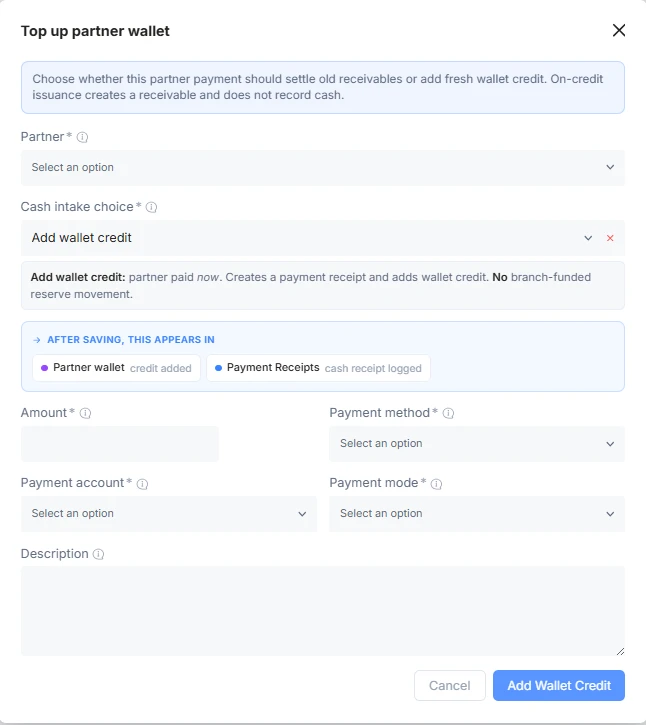
Fill out the form
-
Partner: The partner/senior partner/agent name balance to be added
-
Amount: The amount to add to the top-up
-
Cash Intake Choice: The type of balance addition
-
Payment Method: The type of transaction, whether cash or bank transfer
-
Payment Account: The payment account name defined in ISP CRM
-
Payment Mode: The payment type is online, cash, bank transfer, or other means
-
Description: The brief description of this amount transaction, for what purpose the credit is transferred
Cash Choices
When you open the Top Up Partner Wallet, choose the cash intake choice carefully.
| Choice | Use When | Cash Received Now? | Wallet Changes? | Receivable Changes? |
|---|---|---|---|---|
| Add wallet credit | Partner pays now and wants fresh wallet credit. | Yes | Increases | No |
| Settle receivable | Partner pays off old on-credit debt. | Yes | Usually no | Decreases |
| Issue on credit | The branch gives trusted credit before the partner pays. | No | Increases | Increases |
Add Credit Wallet
Use this when the partner pays now.
Example:
-
Partner pays $500.
-
Choose Add wallet credit.
-
Select partner, amount, payment method, payment account, and payment mode.
-
Save.
-
Partner wallet increases by $500.
-
A payment receipt is recorded.
-
The branch-funded reserve does not change.
Settle Receivable
Use this when a partner pays off old on-credit debt.
Example:
-
Partner owes $300 from earlier on-credit issuance.
-
Partner pays $200 to the branch back
-
Choose Settle receivable.
-
The system suggests the oldest receivables first.
-
Save.
-
Receivable outstanding decreases by $200.
-
Partner wallet does not increase.
If the partner pays more than the outstanding receivables, the excess can become a wallet credit after confirmation.
Example:
-
The partner owes $300.
-
Partner pays $400.
-
$300 settles receivables.
-
$100 becomes a new wallet credit.
Issue On Credit
Use this when the branch gives a trusted partner wallet credit before receiving payment.
Example:
-
The branch approves $300 on credit.
-
Choose the issue on credit.
-
Save.
-
Partner wallet increases by $300.
-
Partner receivable increases by $300.
-
No cash receipt is recorded.
Possibilities in TopUp Wallet
The partner has an overdue receivable
If the partner has overdue receivables and you choose Add wallet credit, the system may block or warn according to permissions. Normally, overdue debt should be settled first.
Wrong Option Selected
If the partner paid cash, do not choose Issue on credit.
If the partner is paying off old debt, do not choose Add wallet credit unless the business intentionally wants the payment to become fresh wallet credit.
Excess Payment
If the settlement payment is larger than receivables, confirm whether the excess should become a wallet credit.
What To Check After Saving
-
The partner wallet changed only when expected.
-
The partner receivable changed only when expected.
-
A payment receipt exists only when cash is received.
-
The branch-funded reserve is unchanged.
-
The description clearly explains the reason.

